
Author of the idea:Iurii Tokman
MQL5 Code Author:barabashkakvn
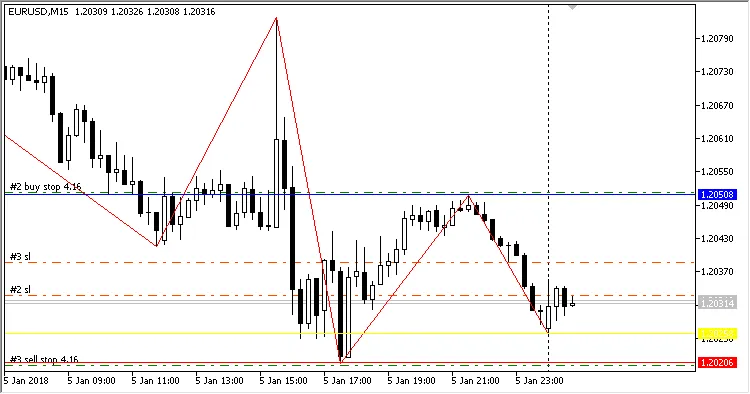
If you're looking to enhance your trading game, the ZigZag EA is a fantastic tool for MetaTrader 5. This Expert Advisor utilizes the ZigZag custom indicator to help you identify market channels. It places Buy Stop and Sell Stop pending orders at the edges of these channels. Once a pending order is activated, you can enable trailing features to manage your position effectively. Plus, the stop loss and take profit levels are strategically set using Fibonacci levels, including 0.0%, 23.6%, 38.2%, 50%, 61.8%, 100%, 161.8%, 261.8%, and 423.6%.
Key Inputs for ZigZag EA
Here are the essential settings you’ll want to tweak to get the most out of your ZigZag EA:
- ZigZag Settings:
- Depth
- Deviation
- Backstep
- EA Operation Time:
- Start Time (Hours)
- Start Time (Minutes)
- Stop Time (Hours)
- Stop Time (Minutes)
- Channel and Indent Settings:
- Indent in Points
- Minimum Channel Size
- Maximum Channel Size
- Money Management Settings:
- Lots
- Risk Level
- EA Settings:
- Stop Loss (% of Account)
- Take Profit (% of Account)
- Trailing Stop (in Pips)
- Trailing Step (in Pips)
- Show Channel Lines
- Magic Number
For those trading EUR/USD on a 15-minute chart, the ZigZag EA can be particularly effective:





Comments 0