
If you’re looking to streamline your trading strategy, Shuriken Lite is a game changer for MetaTrader 4 users.
This handy tool allows you to monitor the performance of up to 10 different trading systems by entering their unique magic numbers in the settings. It’s perfect for those of us using multiple EAs, helping you keep tabs on how each one is performing without breaking a sweat.
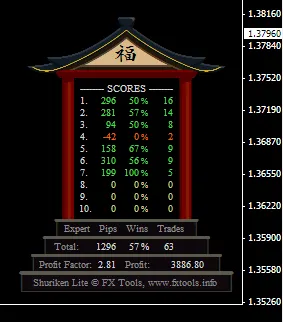
The chart provides a clear overview, showing total pips gained, win percentages, and the number of trades for each EA. You’ll also see combined totals, including the overall Profit Factor and Net Profits, right at your fingertips.
How to Set Up Shuriken Lite:
- First, install the Shuriken.ttf font file by copying it to your C:\Windows\Fonts folder.
- Next, place the Shuriken Lite.mq4 file in the experts folder.
- Apply it to your chart and enter the magic numbers for the EAs you have trading on your account.
- If you want to track your manual trades, simply set the magic number to 0.
Pro Tip:
- Don’t forget to click the Chart Shift button to give the display enough room to shine!




Comments 0