
If you're looking to take your trading game to the next level, the new OpenTime 2 is a must-have upgrade from version 1. This Expert Advisor (EA) is designed specifically for MetaTrader 5, and it's packed with new features that can help enhance your trading strategy.
What's New in Version 2
- This EA now allows you to set two distinct time intervals for opening positions.
- You can specify the days of the week when trading is permitted.
- For each time interval, you can customize the following parameters:
- Trading type: BUY or SELL
- Stop Loss
- Take Profit
It’s worth noting that the same lot size and trailing stop function apply across both intervals, with the EA limited to one open position per interval.
A unique magic number is generated for each time interval. You can set the magic number for interval #1 directly in the input parameters:
inputushort InpTakeProfitTwo = 90; // TakeProfit for time interval #2 (in pips)
inputstring AdvisorOptions = "Advisor Options";
inputulong m_magic = 714479490; // MagicNumber for time interval #1
This magic number is stored in the internal m_magic_one variable, while the magic number for interval #2 is saved in m_magic_two, which is just one unit higher:
//+------------------------------------------------------------------+//---#define m_magic_one m_magic
#define m_magic_two m_magic_one + 1//---#include <Trade\PositionInfo.mqh>
Input Parameters
- Positions Closing Options:
- Use Closing Time Interval #1 - Enable/disable closing by time for interval #1;
- Closing Time Interval #1 (ONLY hour:minute!) - Specify the time to close a position for interval #1;
- Use Closing Time Interval #2 - Enable/disable closing by time for interval #2;
- Closing Time Interval #2 (ONLY hour:minute!) - Specify the time to close a position for interval #2;
- Trailing Stop ("0" -> trailing OFF) (in pips) - Set the trailing stop function; 0 disables it;
- Trailing Step (in pips) - Define the trailing step value.
- Positions Opening Settings:
- Trade on Monday - Enable/disable trading on Monday;
- Trade on Tuesday - Enable/disable trading on Tuesday;
- Trade on Wednesday - Enable/disable trading on Wednesday;
- Trade on Thursday - Enable/disable trading on Thursday;
- Trade on Friday - Enable/disable trading on Friday;
- Opening Start Time Interval #1 (ONLY hour:minute!) - Define the start of time interval #1;
- Opening End Time Interval #1 (ONLY hour:minute!) - Define the end of time interval #1;
- Opening Start Time Interval #2 (ONLY hour:minute!) - Define the start of time interval #2;
- Opening End Time Interval #2 (ONLY hour:minute!) - Define the end of time interval #2;
- Duration in Seconds - Set the operation duration;
- Type of Trade in Time Interval #1 ("true" -> BUY, "false" -> SELL) - Set the allowed trading type for interval #1;
- Type of Trade in Time Interval #2 ("true" -> BUY, "false" -> SELL) - Set the allowed trading type for interval #2;
- Volume Transaction - Specify the volume for the position to open;
- Stop Loss Time Interval #1 (in pips) - Set the Stop Loss for positions in interval #1;
- Take Profit Time Interval #1 (in pips) - Set the Take Profit for positions in interval #1;
- Stop Loss Time Interval #2 (in pips) - Set the Stop Loss for positions in interval #2;
- Take Profit Time Interval #2 (in pips) - Set the Take Profit for positions in interval #2.
- Expert Advisor Options:
- MagicNumber for Time Interval #1 (time interval #2 == MagicNumber + 1) - The unique ID for positions in interval #1; the magic number for interval #2 is greater by one.
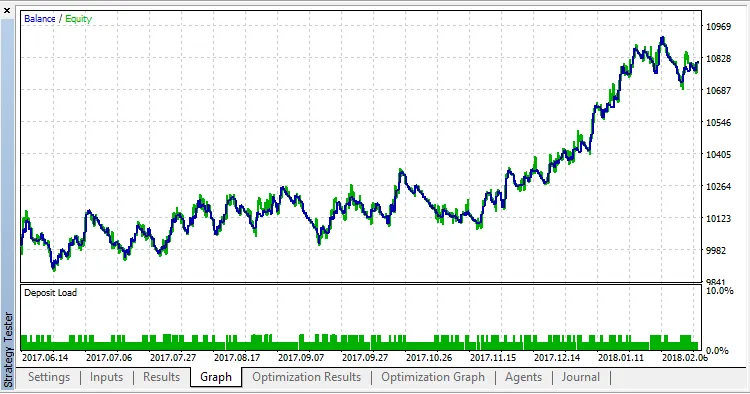
Check out the testing results for EURUSD on the M30 chart:




Comments 0