
Meet the Exp_CHOWithFlat Expert Advisor, a game-changer for your trading strategy! This EA relies on the color change of the CHOWithFlat indicator to generate signals. It kicks into action when a bar closes, signaling a potential trade opportunity with a shift in the indicator's cloud color.
To get started, simply place the CHO.ex5 and CHOWithFlat.ex5 compiled files in your <terminal_data_folder>\MQL5\Indicators directory.
Keep in mind, the TradeAlgorithms.mqh library is essential for utilizing Expert Advisors with brokers that offer nonzero spreads. This library also provides the flexibility to set your Stop Loss and Take Profit levels right when you open a position. If you're looking for more options, feel free to check out additional versions of the library here: Trade Algorithms.
The default input parameters for the Expert Advisor were used during the tests illustrated below, and it's worth noting that neither Stop Loss nor Take Profit was employed in those tests.
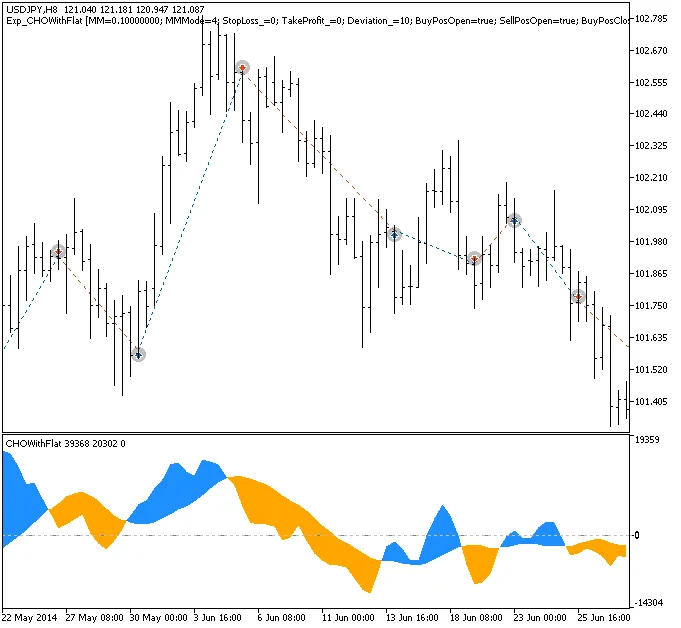
Trade examples on the chart
Here’s a look at the testing results for 2014 on the USDJPY H8 timeframe:
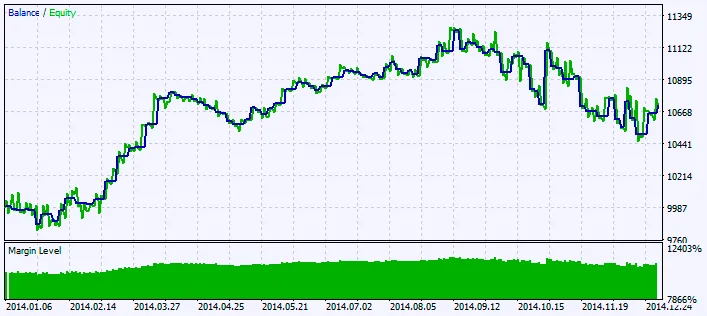
Chart of testing results




Comments 0