
Hey traders! If you're looking to elevate your trading game, let’s dive into the Exp_ColorX2MA_Digit Expert Advisor. This nifty tool is built on the ColorX2MA_Digit indicator, which signals a shift when the color of the indicator line changes as a bar closes.
To get started with the Exp_ColorX2MA_Digit, you’ll need to have the compiled indicator file ColorX2MA_Digit.ex5 in your arsenal. Make sure to place it in your <terminal_data_folder>\MQL5\Indicators directory.
One thing to keep in mind is that the TradeAlgorithms.mqh library file is essential for using Expert Advisors with brokers that offer a nonzero spread. It also enables you to set Stop Loss and Take Profit right when you open a position. For more options, you can check out additional variants of the library here: Trade Algorithms.
During our tests, we used the default input parameters for the Expert Advisor. Just a heads up, we didn’t apply Stop Loss or Take Profit during these tests.
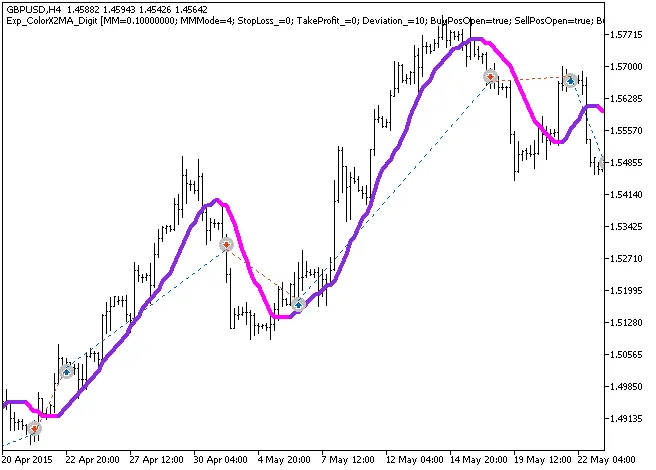
Fig.1. The instances of history of deals on the chart.
Now, let’s take a look at the testing results for 2014 on the GBPUSD H4:
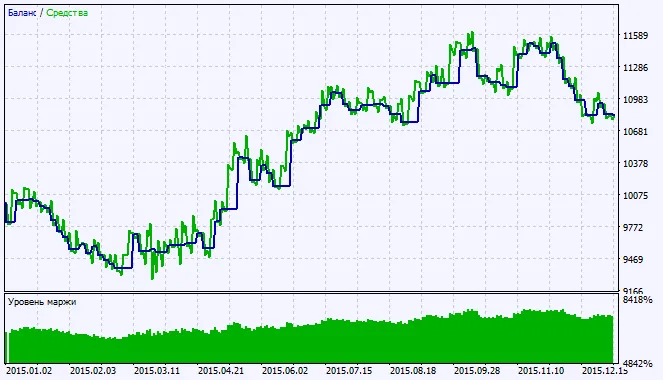
Fig.2. Testing results chart




Comments 0