
If you're on the lookout for a sophisticated trading system, the BlauCMomentum indicator could be just what you need. This robust tool helps traders make informed decisions by analyzing momentum shifts in the market.
When the momentum changes direction or crosses the zero line, that's your cue to enter a trade. To customize your entry strategy, you can tweak the following input parameter:
input AlgMode Mode=twist; // Define the market entry algorithm
To get the most out of your EA, ensure you place the compiled indicator file, BlauCMomentum.ex5, in your terminal's data folder under MQL5/Indicators.
Keep in mind that the TradeAlgorithms.mqh library is tailored for Expert Advisors associated with brokers offering nonzero spreads and the ability to set Stop Loss and Take Profit while opening a position. If you need alternative versions of this library, you can download them from here.
The testing results below utilized the default input parameters of the Expert Advisor, and notably, neither Stop Loss nor Take Profit was applied during these tests.
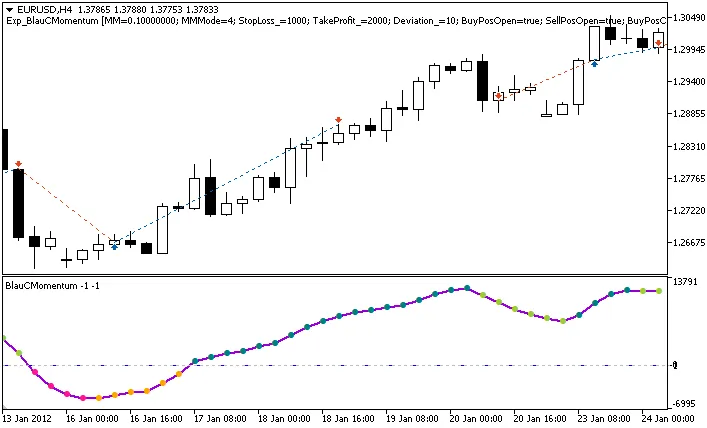
Fig. 1. Trading history instances on the chart.
Here are the testing results for EURUSD on the H4 timeframe during 2012-2013:
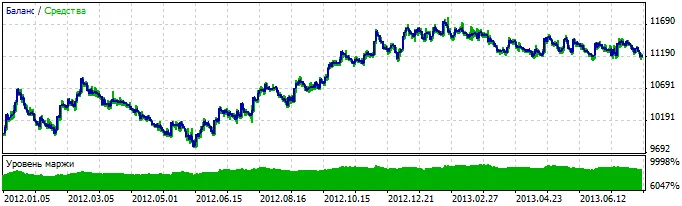
Fig. 2. Chart showcasing testing results.




Comments 0