
Welcome back, fellow traders! Today, I want to dive into an exciting trading system that leverages the MFI_Slowdown indicator. This handy tool generates signals right at the close of a bar whenever a colored indicator arrow pops up.
To get started with this Expert Advisor (EA), you'll need the compiled indicator file MFI_Slowdown.ex5. Make sure to drop it in your terminal's data folder at MQL5/Indicators.
One of the standout features of this EA is its compatibility with brokers that offer nonzero spreads. Plus, it allows you to set your Stop Loss and Take Profit levels right when you open a position. If you're interested in exploring more options, check out the Trade Algorithms library for additional resources.
During the tests I conducted, I used the default input parameters for the Expert Advisor, and I opted not to use Stop Loss and Take Profit for these specific results.
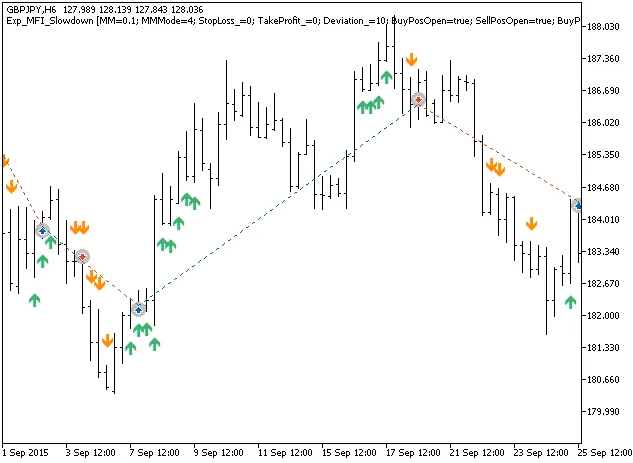
Fig. 1. Examples of deals on the chart
Here are the testing results for GBPJPY on the H6 timeframe in 2015:
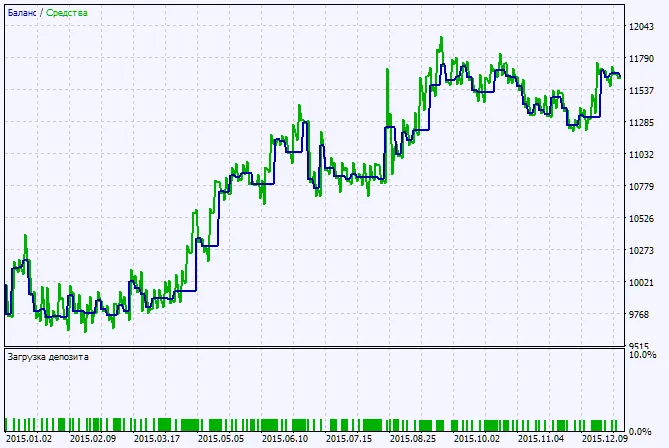
Fig. 2. Chart of testing results




Comments 0