
If you're looking to squeeze more efficiency out of your trading setup, the Murrey Math Indicator is a must-have tool for your MetaTrader 5 platform. This indicator has been designed to limit the computer resources required for calculations and chart displays, making it smoother and more efficient for traders.
New Features to Enhance Your Trading
One of the exciting new features is the added input variable, CountBars, which helps optimize calculations. Here’s a quick look at the input parameters:
//+----------------------------------------------+//|  INDICATOR INPUT PARAMETERS                  |//+----------------------------------------------+inputint CalculationPeriod=64;              //P calculation periodinputint StepBack=0;
inputbool ViewFlag=false;
inputint    FontSize=8;                     //font sizeinput type_font FontType=Font7;              //font typeinputstring  LableSirname="Murrey_Math_Lv"; //First part of the graphical objects namesinput PLOT_DRAW_TYPE_ DrawType=DRAW_ARROW_;  //Option of displaying Murrey levelsinputuint Arrow=160;                        //Symbol for Murrey levelsinputuint ArrowSize=1;                      //Symbol size for Murrey levelsinputuint CountBars=500;                    //number of bars to calculate the indicatorinputuint ForwardBars=3;                    //number of bars to the right of the chart (maximum CalculationPeriod)
Customizing Your Indicator
For those who want to customize the character values, you can use the Wingdings Characters table. The indicator also utilizes the GetFontName.mqh library, which you'll need to copy to your terminal's terminal_data_folder/MQL5/Include directory.
Visual Display Options
You can display the indicator either with symbols or traditional lines, depending on your preference:
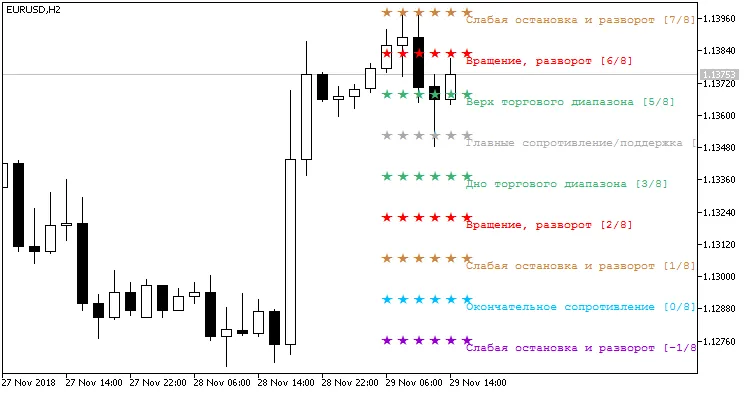
Fig. 1. Indicator Murrey_Math_Lv_Arr_r with the selected option of drawing it with symbols
And here’s how it looks when displayed with traditional lines, based on the DrawType parameter:
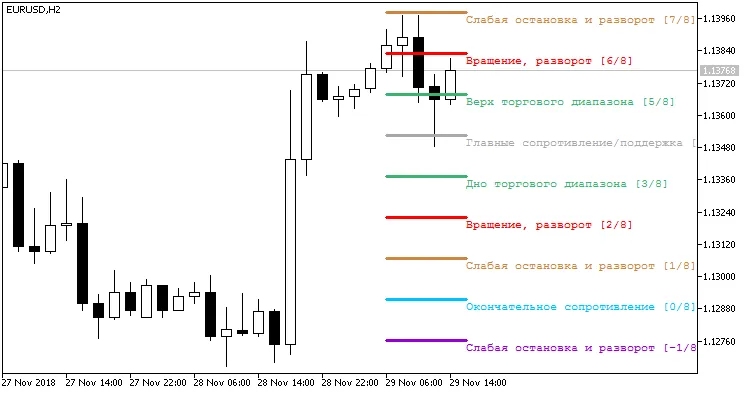
Fig. 2. Indicator Murrey_Math_Lv_Arr_r with the selected option of drawing it with lines




Comments 0