
If you're looking to streamline your trading experience, the latest trade panel for both manual and automated trading is a game changer. Built on the MasterWindows library, this panel showcases what you can do with a little tech wizardry in MetaTrader 5.
By tapping into the price databases of the ENUM_APPLIED_PRICE type, you can get a glimpse of potential future price movements. The panel even displays the probability of these movements, giving you a handy scale and percentage for better decision-making. With this trade panel, you can send trade requests straight to your broker and execute market orders seamlessly. Plus, you have the flexibility to adjust your position volume, close trades, enable or disable Stop Loss, and even turn on the autopilot feature.
What’s Autopilot? It’s your assistant for automated trading, driven by the signals generated by the panel. You can activate this mode with a simple press of a button.
Input Data:
inputbool inp_on_trade=false; // Autopilot (On/Off)inputdouble inp_open=85; // Threshold values for the opening positioninputdouble inp_close=55 // Threshold values for the closing positioninputdouble inp_lot_fix=0.01; // lot fixedinputdouble inp_lot_perc=0.01 // lot as a percentage of equityinputbool inp_on_lot=false // if "false" to % of the equityinputbool inp_on_SL=false // Stop loss (On/Off)
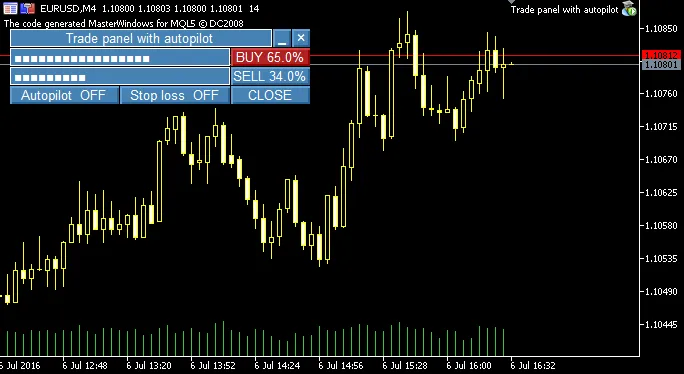
Fig. 1. Appearance of the trade panel.
Recommendations:
- Make sure to add the MasterWindows library to your \MQL5\Include\ folder. This library is key for ensuring your interface windows work smoothly.
- For the best display of your created interface windows, consider using graphical schemes with a black background.
- Keep in mind that this is a demo panel (think of it as a fun experiment) and not designed for live accounts. However, feel free to tweak or replace the BUYorSELL() signal generation function to fit your trading strategy, add a position support function, and see how it performs in a live environment.




Comments 0