
If you're looking to enhance your trading game, the BykovTrend Expert Advisor (EA) for MetaTrader 5 might just be the tool you need. This trading system generates signals based on the BykovTrend indicator, giving you an edge at the close of a bar when a colored indicator arrow appears.
To get started, you'll need to upload the compiled indicator file BykovTrend.ex5 to your MetaTrader 5 platform. Simply save it in your <terminal_data_folder>\MQL5\Indicators directory.
One of the coolest features of this EA is that it utilizes the TradeAlgorithms.mqh library. This means you can trade with brokers offering a non-zero spread, and you can set your Stop Loss and Take Profit levels right when you open a position. If you want to explore more options, check out the Trade Algorithms library at this link: Trade Algorithms.
For the tests highlighted below, we used the default input parameters for the Expert Advisor. Notably, we didn't employ Stop Loss or Take Profit during these tests.
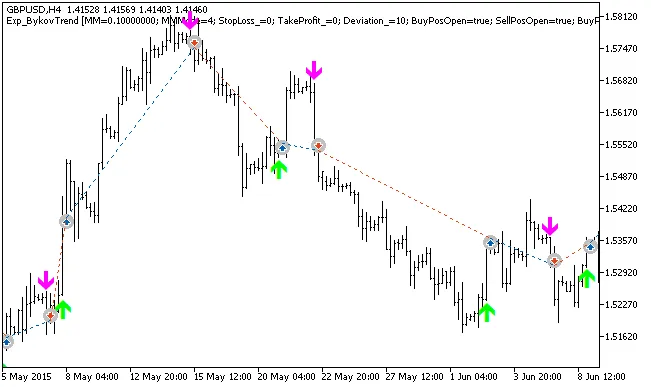
Fig. 1. Examples of trades on the chart
Now, let's dive into the testing results for the GBPUSD on the H4 timeframe from 2015:
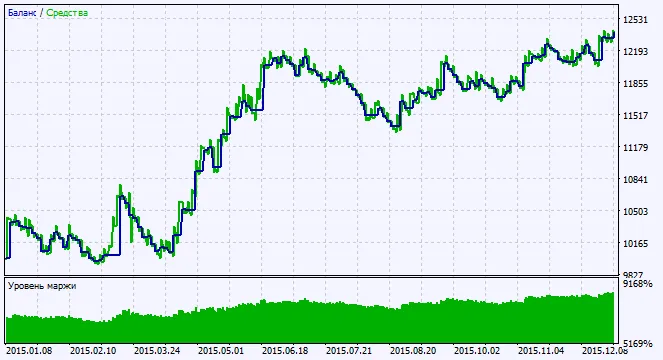
Fig. 2. Chart of testing results




Comments 0