
Understanding the MBKAsctrend3 Trading System
The MBKAsctrend3 trading system is a powerful tool designed to help traders like us identify trend direction changes. It uses the MBKAsctrend3 indicator to generate signals at the close of each bar, allowing you to make informed trading decisions when the next indicator arrow appears.
Getting Started with MBKAsctrend3
To kick things off, simply place the MBKAsctrend3.ex5 compiled file into your terminal_data_folder under MQL5\\Indicators. This will set you up for smooth sailing!
Convenience at Your Fingertips
One of the standout features of this Expert Advisor (EA) is its ability to display the indicator on your chart without you needing to install it manually. Once the EA is running on your chart, the indicator appears automatically. This means you can focus more on trading and less on setup. Plus, the indicator's input parameters match those of the EA, ensuring consistency.
Chart Timeframe Compatibility
Keep in mind that the indicator will only show up if its parameters align with the current chart's timeframe. This is crucial for accurate signal generation!
Testing Insights
During testing, we used the default input parameters for the EA. Notably, we did not incorporate Stop Loss or Take Profit settings in these tests.
Results from 2011: USD/CHF H4 Testing
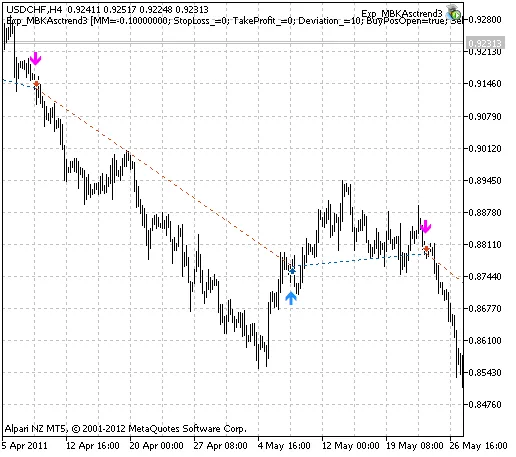
Fig. 1. Instances of deal history on the chart.
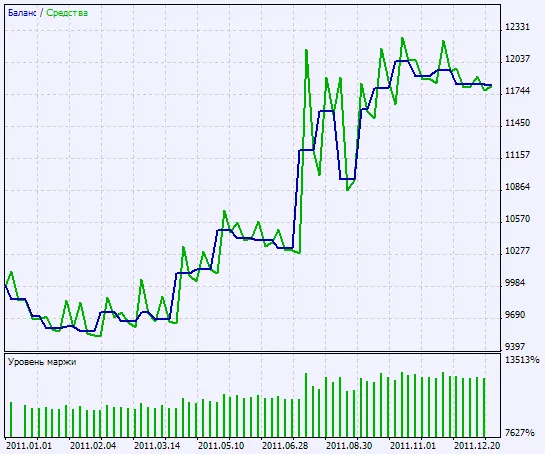
Fig. 2. Chart of testing results




Comments 0