
Getting Started with the Breakout Bars Trend EA
To get the most out of the BreakoutBarsTrend_v2 Expert Advisor (EA), you'll need to download the custom indicator from the MQL5/Indicators folder, while the EA itself can be found in the MQL5/Experts folder.
Here's a quick rundown of how it works:
- The EA opens trades when there's a reversal in the trend. If you set the "Number of false signals" parameter to zero, it will open a position on every reversal. If you set it to a number greater than zero, a new position will only open if the current reversal trend follows the specified number of false signals.
- Positions close when the trend changes direction or hits your stop loss or take profit levels.
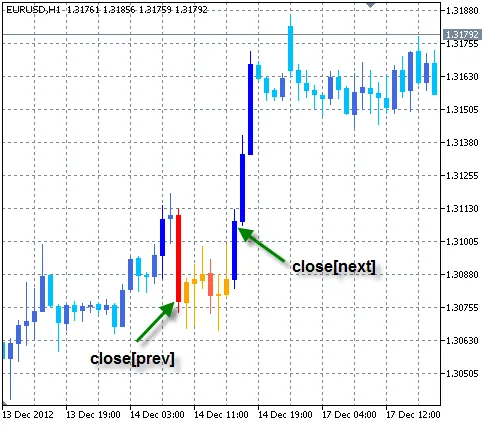
A signal is deemed false if the distance in pips from the close price of the first bar of the trend to the close price of the next trend is negative. For example, a false trend to sell occurs when close[prev] - close[next] < 0, and for a false trend to buy, it’s when close[next] - close[prev] < 0.
Key Parameters to Fine-Tune Your EA
Parameters:
- Reversal: Choose between reversal mode in pips or percentages.
- Delta: Set the minimum distance required for a trend change.
- Number of false signals: This limits entries to only after the specified number of false signals. Setting this to zero means the EA will enter a position on every reversal.
- Additionally, you can configure Stop-loss, Take-profit, and Lot size.
Note! If you choose percentage for the reversal mode, then set Delta, Stop-loss, and Take-profit in percentages as well. Conversely, if using pips for reversal, all parameters must also be in pips!
Testing Results on EURUSD H1
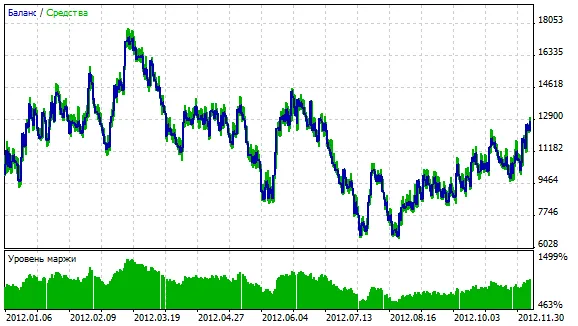
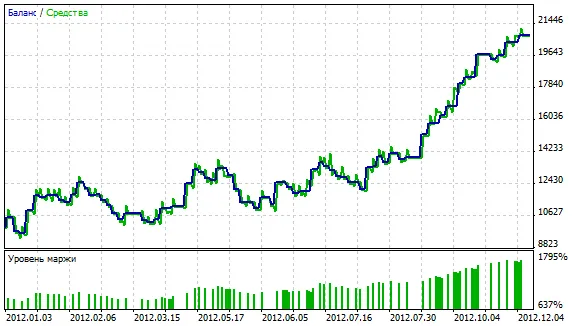
Let's look at the testing results for the EURUSD on the H1 timeframe from 2012. The reversal was set in percentage with Delta at 0.3%, while the stop-loss and take profit were both set to 1%.
a) Here’s how it performed when entering on every reversal (Number of false signals set to 0):
b) Now, the same parameters, but this time entering only after a series of three false signals (Number of false signals set to 3):




Comments 0