
If you’re looking to dive into the world of automated trading, the Martingale Bone Crusher EA for MetaTrader 4 might just be what you need. This expert advisor employs a two-pronged martingale strategy that can help you navigate the ups and downs of the market.
Understanding the Strategies
Strategy 1: The EA will initiate trades based on whether the price is above or below the Moving Average. If a trade results in a loss, it takes a new position in the opposite direction with a larger lot size.
Strategy 2: Similar to the first, this strategy also relies on the position of the price relative to the Moving Average. However, it will take a new trade with a multiplied lot size without regard to whether the previous trade was a buy or sell, again based on the price's position.
Key Features
- This Martingale EA is versatile and can be used on all currency pairs and timeframes.
- The recommended timeframe for optimal performance is daily.
- Start trading with a minimum lot size of 0.01.
Tips for Use
- Always test the EA on a demo account before going live.
- This EA only executes trades based on the opening price of the candle!
- If you prefer not to increase lot sizes after a loss, set IncreaseFactor=0.
Input Settings
- Use_TP_In_Money: Enable Take Profit in monetary values (true/false).
- TP_In_Money: Set your Take Profit in money (values: 10-100).
- Use_TP_In_Percent: Enable Take Profit in percentage (true/false).
- TP_In_Percent: Set your Take Profit in percentage (values: 10-100).
- Enable_Trailing: Turn on trailing stop for multiple trades (true/false).
- Take Profit In Money: Set the trailing take profit amount (values: 25-200).
- Stop Loss In Money: Set the trailing stop loss amount (values: 1-20).
- Strategy: Choose between strategy 1 and strategy 2.
- USEMOVETOBREAKEVEN: Activate the break-even system (0-1).
- WHENTOMOVETOBE: Set when to move to breakeven (values: 10-100).
- PIPSTOMOVESL: Set how many pips to move the stop loss (values: 10-100).
- Multiply: Determine the multiplication factor for Martingale (values: 2-4).
- Lotsize: Define the lot size (values: 0.01-10).
- TrailingStop: Set a value from 10 to 100 to activate trailing stop loss; “0” disables it.
- Stop_Loss: Set the stop loss distance in pips (values: 10-100).
- Take_Profit: Set the take profit distance in pips (values: 10-100).
- MA_period: Define the Moving Average period (values: 10-200).
- MagicNumber: Set the magic number (values: 1-100000).
- Start: Define the start hour for trading (values: 0-24).
- End: Define the end hour for trading (values: 0-24).
- Maximum_loss: Set the maximum allowable loss (values: 0-10).
- WaitTime: Set the wait time for loss in minutes (values: 0-999999).
Final Thoughts
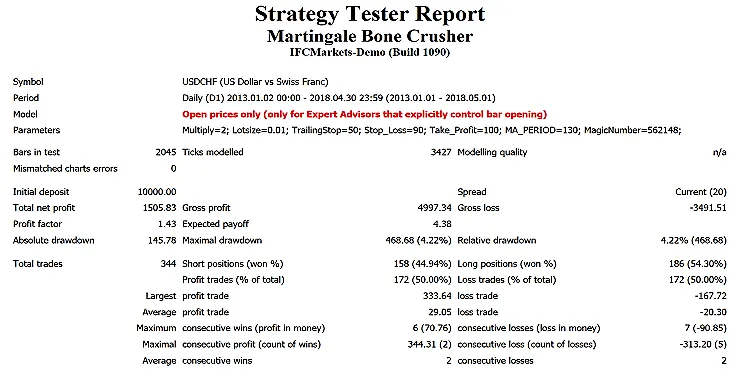
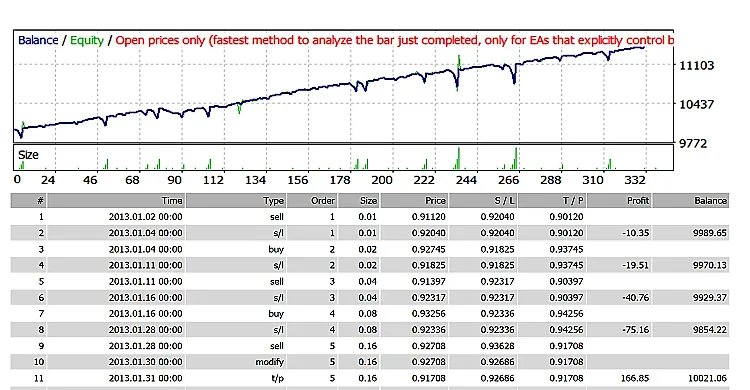
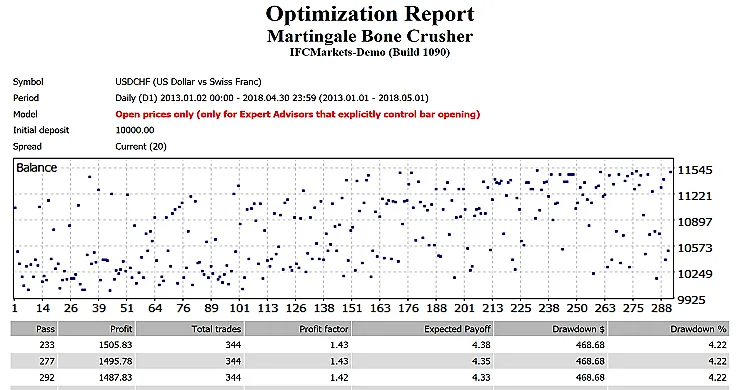
Remember, it's essential to optimize your EA every few months using the same settings outlined above. You can utilize it as either a hedging grid EA or a single trade EA, depending on your trading style. For those looking to backtest, check out this backtesting guide.




Comments 0