
Are you looking to elevate your trading game? Let’s dive into the FatlSatlOsma trading system designed specifically for MetaTrader 5.
This system utilizes the FatlSatlOsma oscillator, which signals when it's time to make a trade by changing direction. It’s a simple yet effective way to identify potential entry points.
To get started, you’ll need the compiled indicator file FatlSatlOsma.ex5. Make sure to place it in your <terminal_data_folder>\MQL5\Indicators directory for the EA to function properly.
One key feature of this Expert Advisor is its compatibility with brokers offering nonzero spreads. Plus, it allows you to set both Stop Loss and Take Profit levels simultaneously when opening a position. For more variations of the essential library, check out this link.
The testing results showcased below were conducted using the default input parameters of the EA. Note that Stop Loss and Take Profit settings were not applied during these tests.
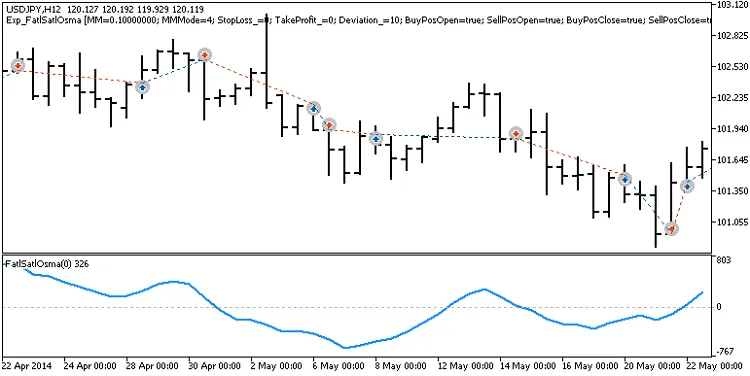
Fig. 1. Examples of deals on the chart
Here’s a look at the testing results for the year 2014 using the USDJPY on the H12 timeframe:
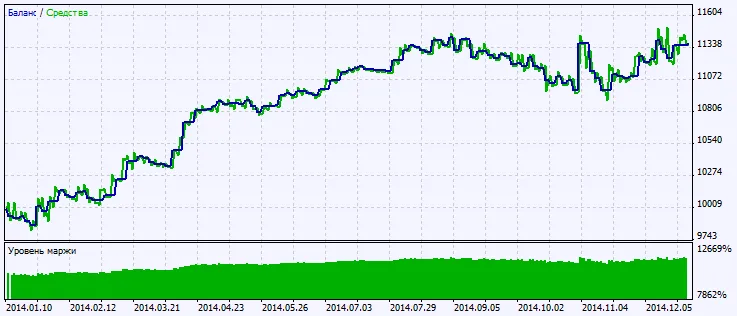
Fig. 2. Testing results chart




Comments 0