
If you're looking to enhance your trading strategy, the RVI Histogram Expert Advisor (EA) for MetaTrader 5 might just be what you need. This EA is designed to generate signals at the close of each bar, helping you make timely trading decisions.
How the RVI Histogram EA Works
The RVI Histogram EA operates by employing one of two trend detection methods based on your chosen input:
- Method 1: Monitors the intersection of the signal line and the main line of the RVI indicator, along with a change in the color of the signal cloud.
- Method 2: Looks for changes in the histogram color, specifically when it shifts from a neutral gray to pink or lime, indicating that the RVI oscillator is entering overbought or oversold territory.
To get started, make sure to upload the compiled indicator file RVI_Histogram.ex5 to your <terminal_data_folder>\\MQL5\Indicators directory.
Utilizing the TradeAlgorithms Library
One cool feature of this EA is its compatibility with the TradeAlgorithms.mqh library. This means you can use it with brokers offering a nonzero spread and set your Stop Loss and Take Profit right when you open a position. For more options, check out additional variants of the library here: Trade Algorithms.
Testing the RVI Histogram EA
The tests below utilized the default input parameters of the EA, and it's worth noting that neither Stop Loss nor Take Profit was applied during these tests.
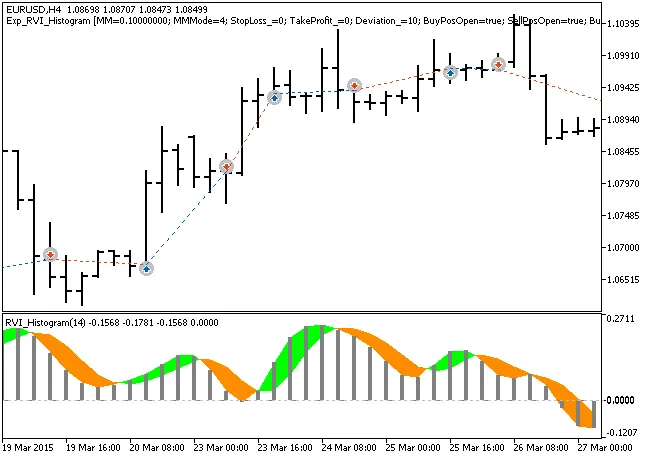
Fig. 1. Trade examples on the chart
The testing results for 2015 on the EUR/USD H4 timeframe are promising:
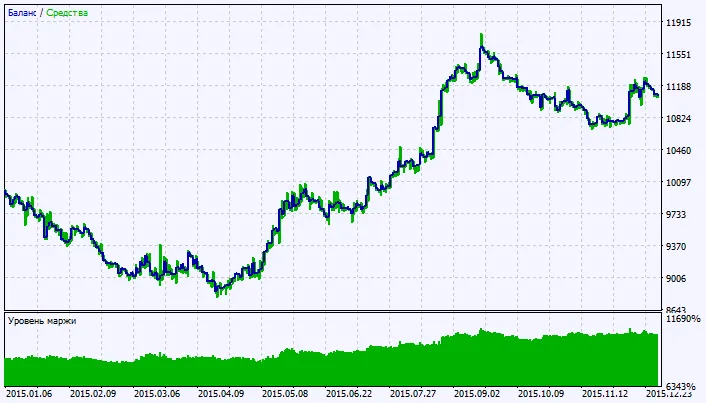
Fig. 2. Testing results chart




Comments 0