
If you're looking to enhance your trading strategy, the Exp_Chaikin_Volatility_Stochastic Expert Advisor (EA) could be just what you need. This EA is built around the popular Chaikin_Volatility_Stochastic indicator and utilizes color changes in the indicator to generate trading signals. Specifically, a signal is triggered when a bar closes and there's a shift in the cloud color of the indicator.
To get started, you'll need to have the compiled indicator file Chaikin_Volatility_Stochastic.ex5 placed in your <terminal_data_folder>\MQL5\Indicators directory for the EA to function properly.
One of the standout features of this EA is its compatibility with brokers that offer a non-zero spread. Plus, it allows you to set your Stop Loss and Take Profit right alongside position openings. If you’re interested in exploring more options, be sure to check out the Trade Algorithms library for additional variants.
The tests conducted below utilized the default input parameters of the EA, and notably, neither Stop Loss nor Take Profit settings were applied during these tests.
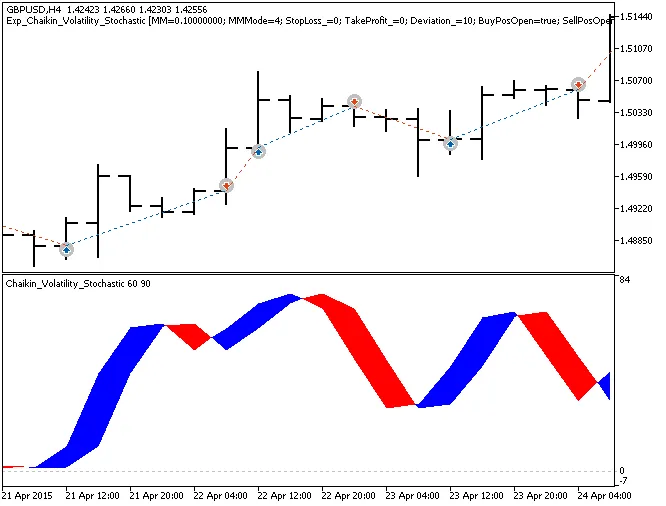
Fig.1. The instances of history of deals on the chart.
Here are the testing results for 2015 using the GBPUSD on the H4 timeframe:
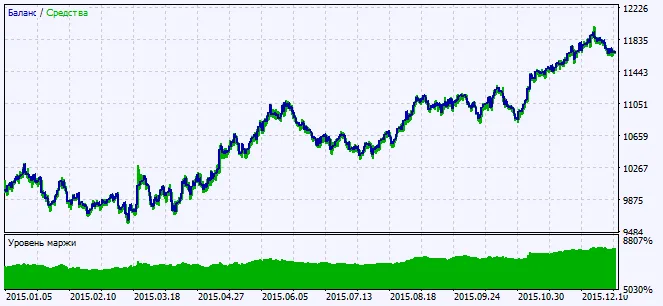
Fig.2. Testing results chart




Comments 0