
Introducing the Exp_StepSto_v1 Trading System
Hey fellow traders! If you're looking to enhance your trading game, let me introduce you to the Exp_StepSto_v1 system. This nifty tool is built on the signals from the StepSto_v1 stochastic oscillator, which can help you make more informed trading decisions.
So, how does it work? The signals are generated at the close of each bar. The key here is the position of the purple signal line. If this line is above 50, our EA (Expert Advisor) will only open long positions and close short ones. Conversely, if it dips below 50, it’s time to flip the script—only shorts will be opened while longs are closed. The actual signals to enter trades are triggered by the purple line breaking through the orange line in the direction of your trade.
How to Set It Up
To get started, simply place the StepSto_v1.ex5 compiled file in your terminal_data_folder\MQL5\Indicators directory. This will ensure that everything runs smoothly.
For the tests detailed below, we used the default input parameters for the Expert Advisor. It's worth noting that we didn't incorporate any Stop Loss or Take Profit levels during these tests.
Testing Results
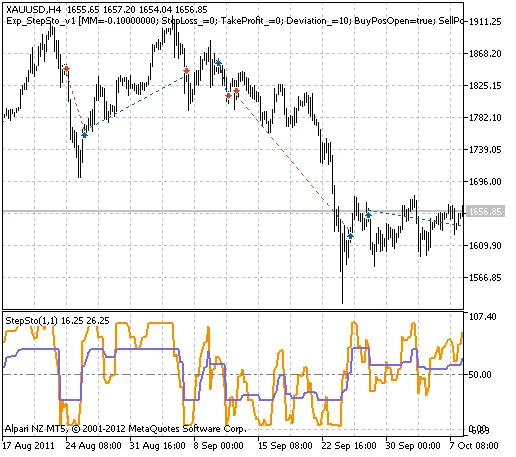
Fig. 1. The instances of history of deals on the chart.
Here are the testing results for 2011 on the XAUUSD H4:
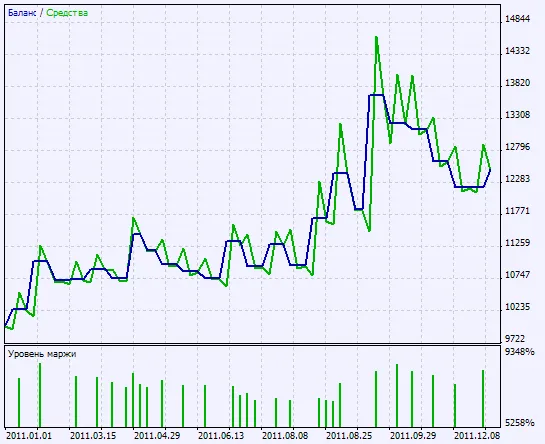
Fig. 2. Chart of testing results




Comments 0