
MQL5 Wizard is a fantastic tool for traders looking to create their own Expert Advisors (EAs) without having to dive deep into programming. If you’re eager to automate your trading strategy, this is a great place to start.
Today, let's dive into a strategy that leverages the Alligator indicator, introduced by Bill Williams in his book, Trading Chaos. This method, known as "Signals Based on the Alligator", can be seamlessly implemented using the MQL5 Wizard.
The Alligator indicator uses three moving averages—referred to as the Lips, Teeth, and Jaw lines—to generate trading signals based on their crossovers. Essentially, when these lines cross, they give us an indication of market trends. For instance, during a bullish trend, the Lips line (the shortest moving average) sits above the Teeth line, which in turn is above the Jaw line (the longest moving average). Conversely, in a bearish trend, the sequence is flipped.
Here's how the trading signals work:
- Open Long Position: Triggered by the crossover of the Alligator lines, with an expanding gap between them during an upward trend.
- Close Long Position: Occurs when the Lips line crosses below the Jaw line.
- Open Short Position: Indicated by the crossover of the Alligator lines and a widening gap during a downward trend.
- Close Short Position: Happens when the Lips line crosses above the Jaw line.
This strategy is encapsulated within the CSignalAlligator class, which simplifies accessing various indicator values.

Figure 1. Trade signals based on the Alligator technical indicator
Understanding the Trade Signals
The CSignalAlligator class contains protected methods that give you easy access to the indicator values:
double Jaw(int ind) // returns the value of Jaw line of the bardouble Teeth(int ind) // returns the value of Teeth line of the bardouble Lips(int ind) // returns the value of Lips line of the bardouble LipsTeethDiff(int ind) // returns the difference between the Lips and Teeth linesdouble TeethJawDiff(int ind) // returns the difference between the Teeth and Jaw linesdouble LipsJawDiff(int ind) // returns the difference between the Lips and Jaw linesbool CheckCross(); // checks the crossover of Alligator lines
1. Opening a Long Position
When it comes to opening a long position, keep in mind the following conditions:
- The CheckCross method is utilized to determine if a crossover occurs, along with an increasing gap between the lines.
- The differences between the Lips and Teeth lines must be increasing, and the Lips line must be higher than the Teeth line.
- Similarly, the difference between the Teeth and Jaw lines must also be increasing, with the Teeth line being higher than the Jaw line.
//+------------------------------------------------------------------+//| Checks conditions to open long position (buy)                   |//+------------------------------------------------------------------+bool CSignalAlligator::CheckOpenLong(double& price,double& sl,double& tp,datetime& expiration)
  {
   if(CheckCross()) return(false);
//---
   price=0.0;
   sl   =0.0;
   tp   =0.0;
//---
   if(LipsTeethDiff(-2)>=LipsTeethDiff(-1) && LipsTeethDiff(-1)>=LipsTeethDiff(0) && LipsTeethDiff(0)>=0.0 &&
      TeethJawDiff(-2) >=TeethJawDiff(-1)  && TeethJawDiff(-1) >=TeethJawDiff(0)  && TeethJawDiff(0) >=0.0)
      m_crossed=true;
//---
   return(m_crossed);
  }
2. Closing a Long Position
To close a long position, check these conditions:
- The Lips line on the next bar should be lower than the Teeth line.
- The Lips line on the current bar should be higher or equal to the Teeth line.
- The Lips line on the previous completed bar should be higher than the Teeth line.
//+------------------------------------------------------------------+//| Checks conditions to close long position                         |//+------------------------------------------------------------------+bool CSignalAlligator::CheckCloseLong(double& price)
  {
   price=0.0;
//---
   return(LipsTeethDiff(-1)<0 && LipsTeethDiff(0)>=0 && LipsTeethDiff(1)>0);
  }
3. Opening a Short Position
Here are the conditions for opening a short position:
- The CheckCross method is again used to identify a crossover and check for a growing gap between the lines.
- The Lips line must be lower than the Teeth line.
- Similarly, the Teeth line must be lower than the Jaw line.
//+------------------------------------------------------------------+//| Checks conditions to open short position (sell)                |//+------------------------------------------------------------------+bool CSignalAlligator::CheckOpenShort(double& price,double& sl,double& tp,datetime& expiration)
  {
   if(CheckCross()) return(false);
//---
   price=0.0;
   sl   =0.0;
   tp   =0.0;
//---
   if(LipsTeethDiff(-2)<=LipsTeethDiff(-1) && LipsTeethDiff(-1)<=LipsTeethDiff(0) && LipsTeethDiff(0)<=0.0 &&
      TeethJawDiff(-2) <=TeethJawDiff(-1)  && TeethJawDiff(-1) <=TeethJawDiff(0)  && TeethJawDiff(0) <=0.0)
      m_crossed=true;
//---
   return(m_crossed);
  }
4. Closing a Short Position
To close a short position, ensure the following:
- The Lips line on the next bar must be higher than the Teeth line.
- The Lips line on the current bar should be lower or equal to the Teeth line.
- The Lips line on the previous completed bar must be lower than the Teeth line.
//+------------------------------------------------------------------+//| Checks conditions to close short position                        |//+------------------------------------------------------------------+bool CSignalAlligator::CheckCloseShort(double& price)
  {
   price=0.0;
//---
   return(LipsTeethDiff(-1)>0 && LipsTeethDiff(0)<=0 && LipsTeethDiff(1)<0);
  }
Creating Your Expert Advisor with MQL5 Wizard
To set up a trading robot using this strategy, select the signal type as "Signals Based on the Alligator" from the MQL5 Wizard’s options.
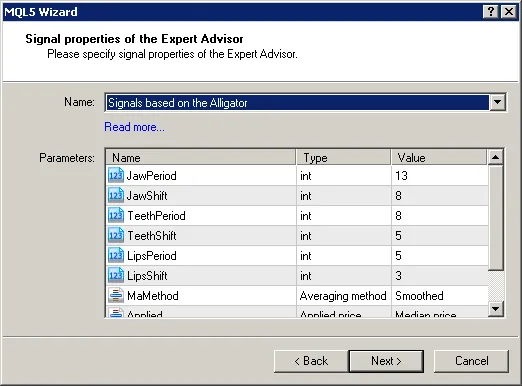
Figure 2. Select "Signals Based on the Alligator" in MQL5 Wizard
Next, you'll need to specify the trailing stop algorithm and the money management system that fits your trading style. The EA code will be generated automatically, and you can compile and test it using the Strategy Tester in the MetaTrader 5 platform.
Testing Results
Let’s take a look at the backtesting results of the EA using historical data (EUR/USD H1, testing period: 1.1.2010 - 05.01.2011, with the specified Jaw, Teeth, and Lips periods and shifts).
In this example, we used a fixed volume setup (Trading Fixed Lot, at 0.1). No trailing stop algorithm was applied.
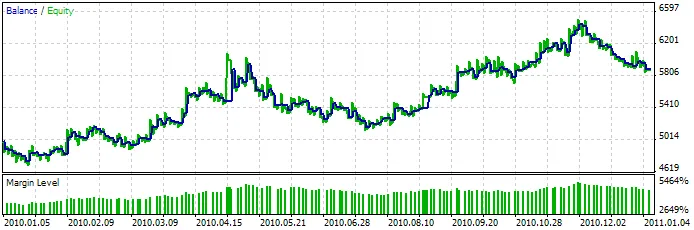
Figure 3. Testing Results of the Expert Advisor with trading signals based on the Alligator indicator
You can enhance profits by applying deal filtration and considering market conditions over time. The CSignalITF class helps introduce intraday time filters. Find the best trading times with the Strategy Tester. For a practical example, check out MQL5 Wizard - Trade Signals with an EMA Crossover and Intraday Time Filter.
Attachments: Ensure that the SignalAlligator.mqh file containing the CSignalAlligator class is placed in your terminal's terminal_data_folder\MQL5\Include\Expert\Signal directory. The expert_alligator.mq5 file includes the Expert Advisor code created using MQL5 Wizard.




Comments 0