
If you're diving into the world of automated trading, you might want to check out a trading system that leverages the signals from the ASCtrend indicator. This system generates signals right at the close of a bar whenever a color point from the indicator pops up.
To get started, ensure you have the compiled ASCtrend.ex5 indicator file uploaded to your <terminal_data_folder>\MQL5\Indicators directory. This is essential for the Expert Advisor (EA) to function properly.
One of the standout features of this EA is its compatibility with the TradeAlgorithms.mqh library. This means you can use it with brokers that offer a non-zero spread and set your Stop Loss and Take Profit levels at the time you open a position. If you're looking for more options, check out additional variants of the library here: Trade Algorithms.
During our testing phase, we utilized the default input parameters of the EA, and it's worth noting that neither Stop Loss nor Take Profit settings were applied during these tests.
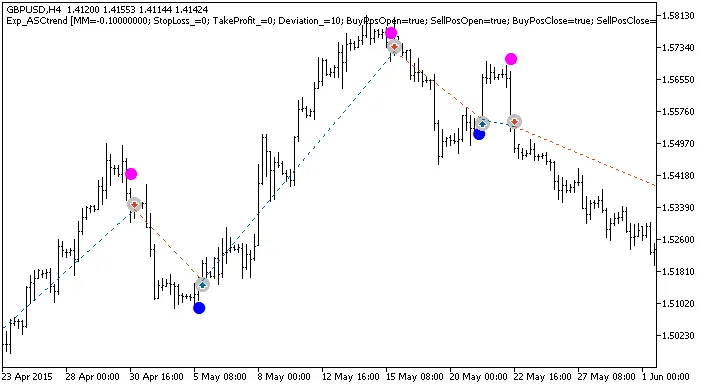
Fig. 1. Examples of trades on the chart
Looking at the testing results from 2015 for GBPUSD on the H4 timeframe:
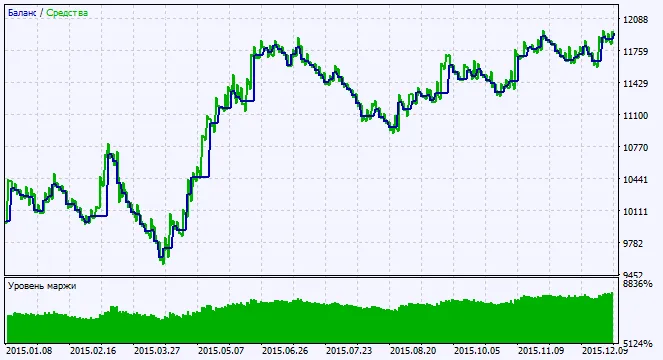
Fig. 2. Chart of testing results




Comments 0