
If you're looking to boost your trading game, the Exp_ColorZerolagTriXOSMA Expert Advisor (EA) is worth a closer look. This system is built on the ColorZerolagTriXOSMA histogram, which effectively signals when it's time to shift your trading direction. The signals are triggered as bars close, particularly when there's a change in the direction of the Moving Average.
To get started with this EA, you'll need the compiled indicator file ColorZerolagTriXOSMA.ex5. Make sure to place it in your <terminal_data_folder>\MQL5\Indicators to ensure it runs smoothly.
One thing to keep in mind is the TradeAlgorithms.mqh library. This is essential if you're working with brokers that offer a nonzero spread. Plus, it lets you set your Stop Loss and Take Profit parameters right alongside position opening. For more options, you can check out additional variants of this library here: Trade Algorithms.
The testing for the default input parameters of this Expert Advisor has been conducted without utilizing Stop Loss and Take Profit. Below, you'll find the results from these tests.
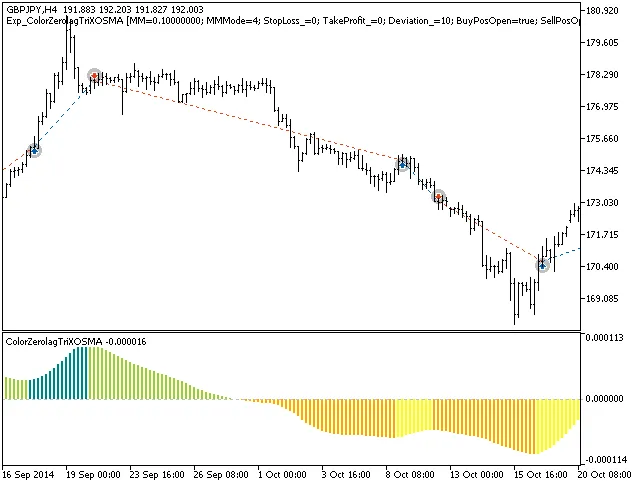
Fig.1. Trade examples on the chart
Here are the testing results for 2014 on the GBPJPY H4:
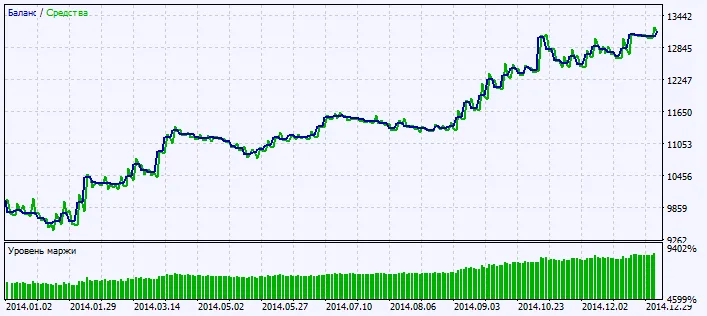
Fig.2. Testing results chart




Comments 0