
If you're looking to dive deep into your trades, this handy utility for MetaTrader 5 is just what you need! It displays key statistics like high, low, open, close, and time for any bar you select on your chart. The best part? It operates efficiently, keeping its data collection separate from the usual quote processing, so you can focus on what really matters – your trading!
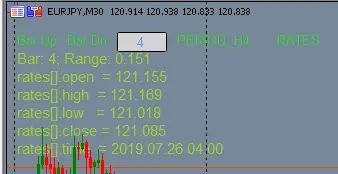
User Input Values:
- Uniquifier:
input int Uniquifier = 3;
This sets a unique instance number for the indicator. If you're running multiple instances, feel free to change this number. It also adjusts how the indicator displays on your chart. - Direct Click:
input ENUM_ON_OFF DirectClick = ON;
With this option, you can select bars directly by clicking on the chart. Just keep in mind that this might interfere with other control clicks.
Display Controls:
- Bar Up: Click this text to move to the next bar.
- Bar Down: Click this text to move back to the previous bar.
- The Box: Enter the bar number directly here for quick access.
- Period: Click here to increase the timeframe for the displayed bar.
- _H4: Click to decrease the timeframe of the displayed bar.
- Rates: Click this to cycle through various data acquisition methods.
This utility offers three methods for retrieving a single bar's statistics:
- COPY_FUNCS: Using functions like CopyClose, CopyHigh, CopyLow, and CopyTime.
- DIRECT: Accessing values via iClose, iHigh, iLow, iOpen, and iTime.
- RATES: Utilizing CopyRates to pull data into an MqlRates structure.
This functionality is designed for those who want to explore different ways of extracting bar information.
The indicator also highlights the bar you're analyzing. For instance, here's a highlight of an H4 bar on an M30 chart:
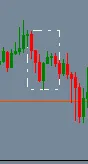
Keep in mind, if the timeframe of the bar is less than or equal to the chart's timeframe, this highlight might be a little tricky to spot.




Comments 0