
What is the QQE Indicator? The QQE, or Quantitative Qualitative Estimation, is a powerful tool for traders using MetaTrader 5 (MT5). This indicator is built on a sophisticated calculation of smoothed RSI values, resulting in two distinct lines within a dedicated indicator window—one fast and one slow. An important level to keep an eye on is the 50-mark, which serves as a key reference point for trading signals. Plus, you can set up text, sound, and email alerts to keep you in the loop. This QQE version also supports multi-timeframe analysis, allowing you to view higher timeframe data while trading. It’s compatible with both MT4 and MT5 platforms.
What’s great is that the QQE indicator is free and open-source, making it easy for you to download and install on your trading platform.
Input Parameters
- SF (default = 5) — Smoothing factor for the indicator.
- AlertOnCrossover (default = false) — Set to true to receive alerts when the two QQE lines cross.
- AlertOnLevel (default = false) — Set to true to get alerts when the QQE RSI line crosses a specified level.
- AlertLevel (default = 50) — This is the level for alerts; it's advised not to change it.
- ArrowsOnCrossover (default = true) — Set to true to visualize arrows on the chart when QQE lines cross.
- CrossoverUpArrow (default = clrGreen) — Color for bullish crossover arrows.
- CrossoverDnArrow (default = clrRed) — Color for bearish crossover arrows.
- ArrowsOnLevel (default = true) — Set to true to see arrows on the chart when the QQE RSI line crosses the defined level.
- LevelUpArrow (default = clrGreen) — Color for arrows when the line crosses up.
- LevelDnArrow (default = clrRed) — Color for arrows when the line crosses down.
- NativeAlerts (default = false) — Set to true for in-platform message alerts.
- EmailAlerts (default = false) — Set to true to receive email alerts based on your MetaTrader settings.
- NotificationAlerts (default = false) — Set to true for push notifications to your device.
- UpperTimeframe (default = PERIOD_CURRENT) — If set to a higher timeframe, the indicator will calculate using that timeframe's data.
- ObjectPrefix (default = "QQE-") — This is for naming chart objects to avoid conflicts with other indicators.
Strategy and Example
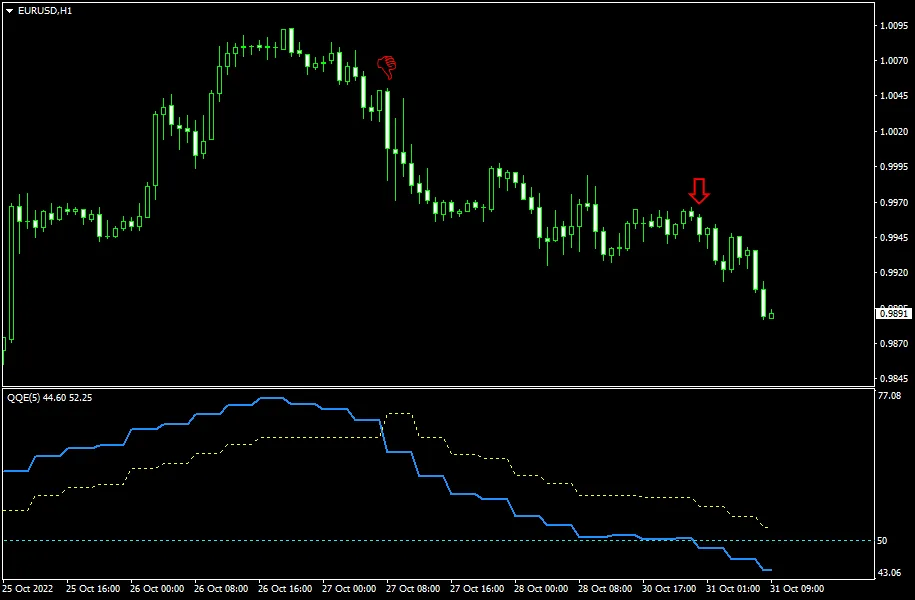
The QQE indicator acts as a versatile oscillator, suitable for direct signals or divergence analysis. It provides two types of signals: when the two lines cross and when the blue line crosses a specific level. A sell signal is generated when the blue line crosses the yellow line from above, and a buy signal when it crosses from below. Similarly, if the blue line crosses the designated level from above, it indicates a sell, while crossing from below suggests a buy.
Take a look at the example below, which features an hourly chart of EUR/USD. This QQE instance utilizes data from the 4-hour chart to plot its lines. The two red arrows indicate bearish signals; the first arrow represents a crossover of the lines, while the second is triggered by the blue line crossing the 50 level.




Comments 0