
Author: Rasoul Mojtahedzadeh
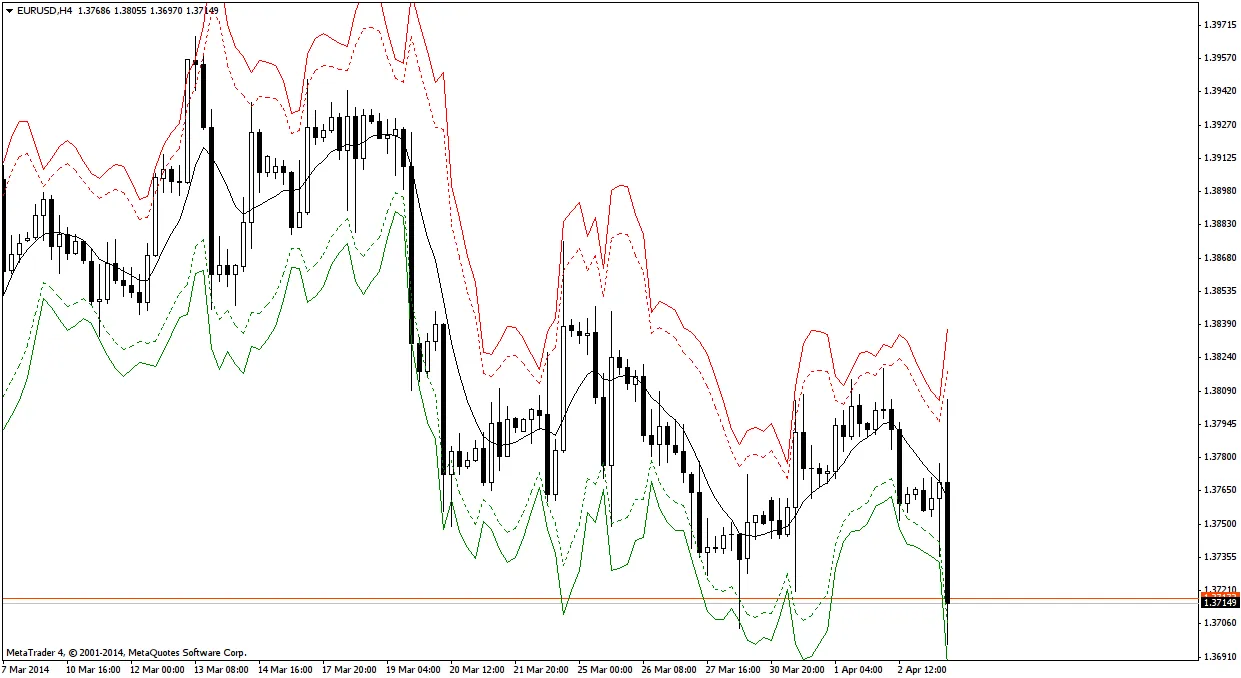
The MA-ATR indicator is a powerful tool that combines the insights of Moving Averages (MA) and the Average True Range (ATR) to help you identify potential trading signals. Here’s how it works:
- The black solid line represents the Moving Average.
- The red solid line shows MA + 2 * ATR.
- The red dashed line indicates MA + 1.5 * ATR.
- The green solid line reflects MA - 2 * ATR.
- The green dashed line signifies MA - 1.5 * ATR.
Entry Rules:
- Wait for the price to cross over the Moving Average line and close on the opposite side.
- Determine the trade direction based on the crossover:
- Go long if the price crosses from below and closes above the Moving Average.
- Go short if the price crosses from above the Moving Average and closes below.
- Ensure the trade aligns with the current trend:
- A long position should have a positive Moving Average slope.
- A short position should have a negative Moving Average slope.
- Avoid trading if the Moving Average slope is flat.
- Be cautious of the highest high or lowest low; they should not touch, pass, or come close to the dashed lines (these are your reversal points).
Exit Rules:
- Close the position if the price crosses the Moving Average to the opposite side of your entry and reaches the 1.5 ATR level.
- Close the position if the price crosses the Moving Average to the opposite side and closes there.
- Close the position if the price hits the 2.0 ATR level.
- Close the position if the price crosses the 1.5 ATR level on the entry side and closes:
- Below the 1.5 ATR line for long positions.
- Above the 1.5 ATR line for short positions.




Comments 0