
Hey there, fellow traders! If you're looking to level up your trading game, let me introduce you to the WeightOscillator_Alert—a fantastic trend indicator for MetaTrader 5 that not only visualizes trends but also sends alerts directly to your mobile devices. This means you can stay on top of market movements, even when you're on the go!
Let's dive into some of the new features and improvements that have been implemented to enhance the user experience:
- Signal Generation Options: We've declared an enumeration for the options of signal generation globally, right before the input variables. This allows you to choose between breakout signals and trend signals effortlessly.
- New Input Parameters: We've added several input parameters for alerts, including:
- SignMode: Choose between
MODE_SIGNALfor breakout signals orMODE_TRENDfor trend signals. - Number of Bars: Set the number of bars to generate a signal.
- Sound Alerts: Enable sound alerts, so you never miss a signal.
- Email Notifications: Choose to receive emails whenever a signal is generated.
- Push Notifications: Get alerts sent straight to your mobile device.
- SignMode: Choose between
- Signal Functions: We've introduced three new functions at the end of the indicator code to manage signals effectively:
- BuySignal(): This function handles everything related to buy signals.
- SellSignal(): This function takes care of sell signals.
- GetStringTimeframe(): A utility function that returns the timeframe as a string.
- Signal Calls: The
OnCalculate()block now includes calls to the BuySignal() and SellSignal() functions, ensuring you get alerts at the right time.
In the example above, we've used the ColorBuffer to determine the oscillator's position in overbought and oversold areas, with values 0 and 4 corresponding to those levels. Just a quick tip: make sure to only call the BuySignal() and SellSignal() functions once in the OnCalculate() block of your code to keep things smooth.
The WeightOscillator_Alert makes use of the SmoothAlgorithms.mqh library, which you can easily integrate by copying it to your <terminal_data_folder>\\MQL5\\Include. If you're curious about how this library works, check out the detailed article titled "Averaging Price Series for Intermediate Calculations Without Using Additional Buffers".
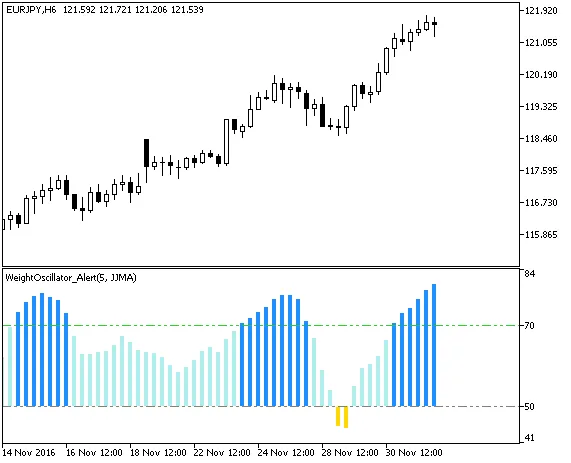
Fig1. The WeightOscillator_Alert indicator on the chart
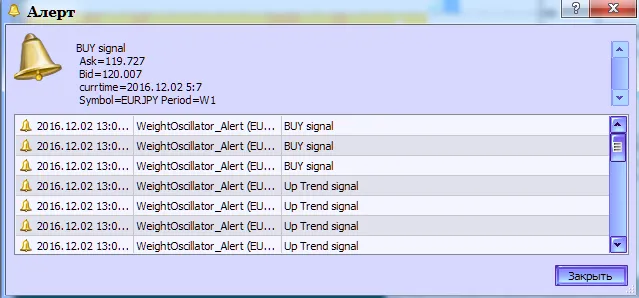
Fig.2. The WeightOscillator_Alert indicator. Generating alert for breakout signal
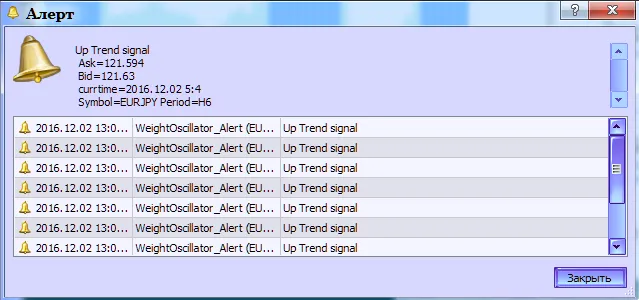
Fig.3. The WeightOscillator_Alert indicator. Generating alert for trend signal




Comments 0