
If you're looking to elevate your trading game, the CaudateXPeriodCandle might just be the tool you need. This trading system is built around a unique indicator that signals trades while allowing you to set a fixed holding time for your positions. Essentially, when a bar closes and a caudate candlestick appears, that's your cue to act!
One of the standout features of this system is the ability to close your position automatically once it reaches your predetermined holding time. Here’s how you can set it up:
inputbool TimeTrade=true; //Enable position exit by timeinputuint nTime=240; //Open position holding time in minutes
To ensure that your Expert Advisor (EA) runs smoothly, make sure the compiled CaudateXPeriodCandle.ex5 file is located in the <terminal_data_directory>\MQL5\Indicators folder. This is crucial for the EA to function as intended.
Also, keep in mind that the TradeAlgorithms.mqh library file is a game-changer. It allows you to use EAs with brokers that have non-zero spreads, and lets you set Stop Loss and Take Profit parameters right when you open a position. If you're interested, you can check out more variants of this library here: Trade Algorithms.
The testing results below were obtained using the default input parameters of the EA, with no Stop Loss or Take Profit applied during the tests.
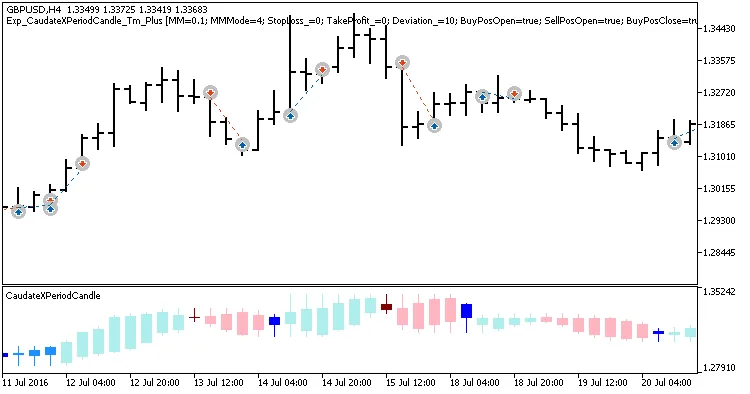
Fig. 1. Examples of deals on the chart
When we tested this EA for 2016 with GBPUSD on the H4 timeframe, the results were impressive:
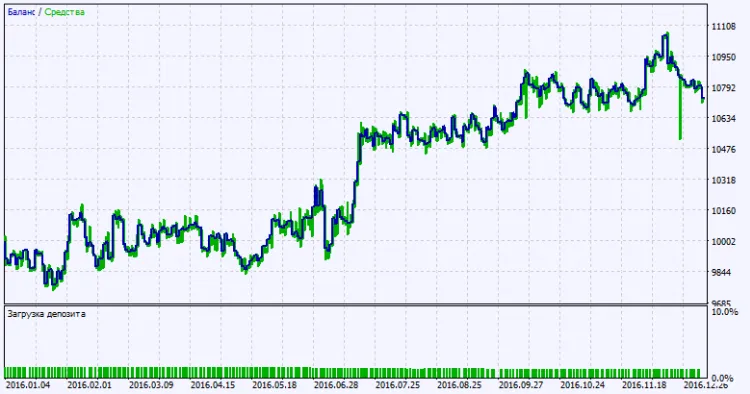
Fig. 2. Testing results chart




Comments 0