
Welcome, fellow traders! Today, we're diving into an innovative trading system that utilizes the signals from the ColorBears indicator. This system triggers signals based on the color changes of the indicator histogram when a bar closes, making it a great tool for your trading arsenal.
To get started, you'll need the compiled indicator file, ColorBears.ex5. Make sure to place it in your <terminal_data_folder>\MQL5\Indicators directory to ensure everything runs smoothly.
Also, keep in mind that the TradeAlgorithms.mqh library allows you to use Expert Advisors with brokers that offer nonzero spreads. This library also gives you the flexibility to set Stop Loss and Take Profit at the same time as opening a position. If you're interested in more variations of this library, check it out here: Trade Algorithms.
The default input parameters for the Expert Advisor were used in the tests outlined below, and no Stop Loss or Take Profit settings were applied during these tests.
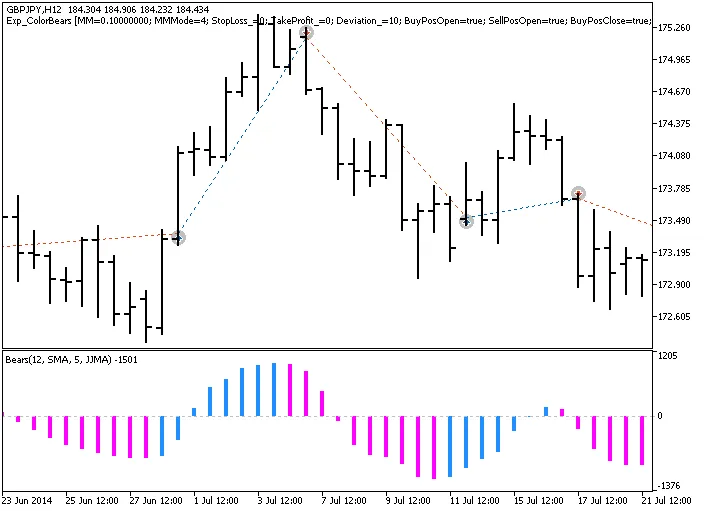
Fig. 1. Trade examples on the chart
Here are the testing results for 2014 on the GBPJPY H12:
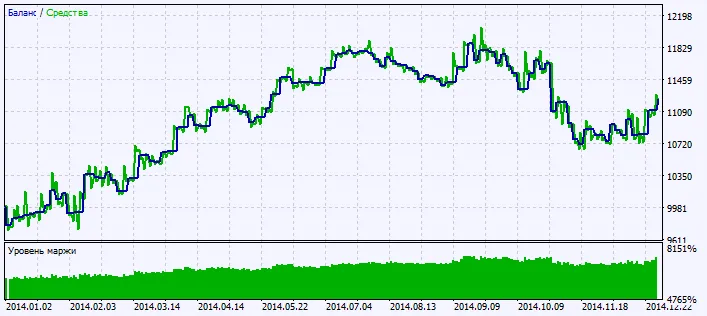
Fig. 2. Chart of testing results




Comments 0