
If you're on the lookout for a solid trading system, let me introduce you to the ColorBulls indicator. This tool generates signals based on the color changes in its histogram as a bar closes, making it a handy companion for your trading strategies.
To get started with this Expert Advisor (EA), you'll need to have the compiled indicator file ColorBulls.ex5. Simply drop it into your <terminal_data_folder>\MQL5\Indicators folder, and you’re good to go!
One important thing to keep in mind is the TradeAlgorithms.mqh library file. This allows you to use EAs with brokers that offer nonzero spreads and lets you set your Stop Loss and Take Profit levels right when you open a position. You can grab more versions of this library by following this link: Trade Algorithms.
In the testing phase, we used the default input parameters for the Expert Advisor, without applying Stop Loss and Take Profit settings. Check out the results below for a glimpse of what you can expect!
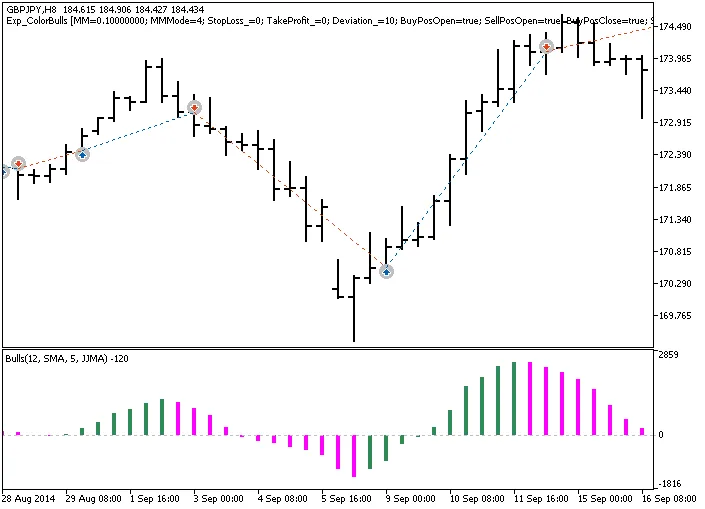
Fig. 1. Trade examples on the chart
Now, let’s dive into the testing results for 2014, specifically for GBPJPY on the H8 timeframe:
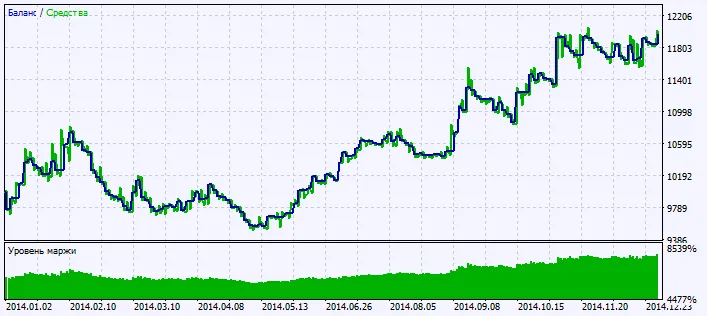
Fig. 2. Chart of testing results




Comments 0