
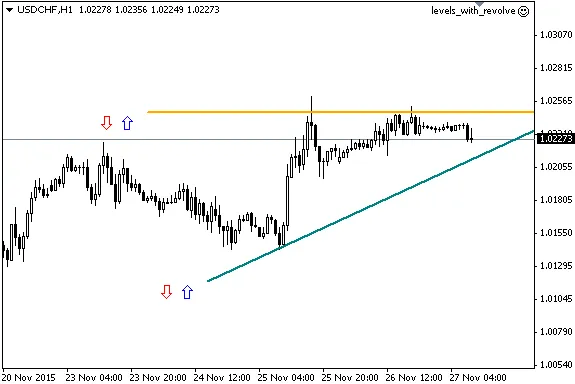
If you’re looking to enhance your trading game, the Levels with Revolve EA for MetaTrader 4 is a solid tool to have in your arsenal. This Expert Advisor opens trades based on support and resistance levels you've set, using trendlines from your toolbar. It’s as simple as pointing and clicking—just select the direction with the arrows!
What’s great about this EA is its ability to adapt. If an opposite signal pops up from another level, the EA smoothly revolves the deal for you, keeping your strategy dynamic.
There are two main trading options to choose from:
- Trade the Move from Levels: If the open price is below the level, this EA will trigger a sell position when the price crosses that level. Conversely, if it’s above, a buy position will be opened.
- Trade the Crossing Levels: In this scenario, if the open price is under the level, the EA will initiate a buy position once the price breaches that level. For sell positions, the opposite condition applies.
Different colors represent the various levels based on their angles. And here’s a tip: if the arrows don’t seem right, the level will appear thin, indicating it's “off.” To create a horizontal level, just drag the second handle to the left of the first one.




Comments 0