
Introduction to Straddle&Trail Expert Advisor
If you're looking to enhance your trading game on MetaTrader 4, the Straddle&Trail Expert Advisor (EA) might just be what you need. This handy tool allows you to set up trades that can take advantage of market volatility, especially around news events.
Input Parameters
Let's dive into the key input parameters that you need to know:
externboolShutDown.NOW = False; // Close all positions if set to trueexternstringsStr00 = "0=Everything";
externstringsStr01 = "1=All Triggered Positions";
externstringsStr02 = "2=Triggered Long";
externstringsStr03 = "3=Triggered Short";
externstringsStr04 = "4=All Pending Positions";
externstringsStr05 = "5=Pending Long";
externstringsStr06 = "6=Pending Short";
externintShutDown.What = 0;
externboolShutDown.Current.Pair.Only = True; // Shutdown trades for current pair onlyexterndoubleLots = 1;
externintSlippage = 10;
externintDistance.From.Price = 30; // Distance for pending ordersexternintStopLoss.Pips = 30; // Initial stop lossexternintTakeProfit.Pips = 60; // Initial take profitexternintTrail.Pips = 15; // Trailing stopexternboolTrail.Starts.After.BreakEven = true; // Start trailing after hitting break-evenexternintMove.To.BreakEven.Lock.pips = 1; // Lock pips once in profitexternintMove.To.BreakEven.at.pips = 5; // Move to break-even after x pips
Testing Parameters
To get the most out of the Straddle&Trail EA, here are the parameters I recommend for testing:
- Symbol: EURUSD
- Period: M5
- Model: All ticks
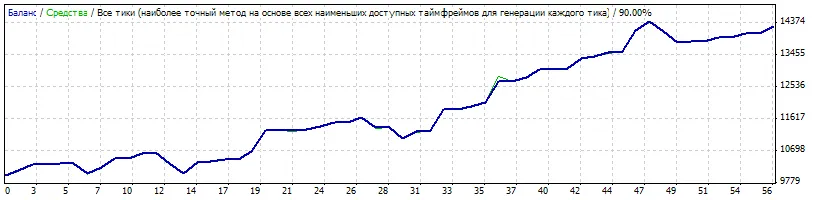
Test Chart
Check out the test results in the chart below:
Happy trading! If you have any questions or want to share your experiences with the Straddle&Trail EA, feel free to drop a comment below.




Comments 0