
MQL5 Wizard is a fantastic tool for traders looking to automate their strategies by generating Expert Advisors (EAs) effortlessly. If you're curious about how to create your own EAs, check out the guide on Creating Ready-Made Expert Advisors in MQL5 Wizard for all the details.
In this post, we’ll dive into a strategy that uses price crossovers with the Moving Average (MA) indicator, aptly named "Signals based on price crossover with MA". This approach helps traders identify key entry and exit points by analyzing the interaction between price and the moving average.
Here’s how the trade signals work:
- Buy Signal: When the price crosses above the Moving Average.
- Sell Signal: When the price crosses below the Moving Average.
- To refine these signals, we check whether the Moving Average is trending upwards or downwards, which helps filter out false signals.
This straightforward strategy is integrated into the CSignalMA class of the MQL5 Standard Library (you can find it at MQL5\Include\Expert\Signal\SignalMA.mqh).
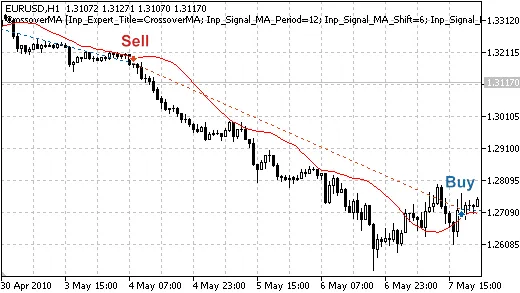
Figure 1. Trade signals based on price crossover with Moving Average
Understanding Trade Signals
The CSignalMA class provides several handy methods to access indicator values and price data, making it easier for you to code your strategies:
double MA(int ind) // returns the value of moving average of the bardouble Open(int ind) // returns the opening price of the bardouble Close(int ind) // returns the closing price of the bardouble StateMA(int ind) // returns positive value if average increases and negative if decreasesdouble StateOpen(int ind) // returns the difference between the opening price and moving average double StateClose(int ind) // returns the difference between the closing price and moving average
1. Opening a Long Position
To open a long position, we look for the following conditions (price crossover with MA and ensuring MA is increasing):
- Open(1) < MA(1): The opening price is below the moving average;
- Close(1) > MA(1): The closing price is above the moving average;
- MA(1) > MA(2): This checks that the moving average is trending upwards (filtering out false signals).
//+------------------------------------------------------------------+//| Checks conditions to open long position (buy)                     |//+------------------------------------------------------------------+bool CSignalMA::CheckOpenLong(double& price,double& sl,double& tp,datetime& expiration)
  {
   price=0.0;
   sl   =0.0;
   tp   =0.0;
//--- price has crossed upward the MA and MA increases
   return(StateOpen(1)<0 && StateClose(1)>0 && StateMA(1)>0);
  }
2. Closing a Long Position
To close a long position, we look for these conditions (price crossover with MA and ensuring MA is decreasing):
- Open(1) > MA(1): The opening price is above the moving average;
- Close(1) < MA(1): The closing price is below the moving average;
- MA(1) < MA(2): This checks that the moving average is trending downwards (filtering out false signals).
//+------------------------------------------------------------------+//| Checks conditions to close long position                          |//+------------------------------------------------------------------+bool CSignalMA::CheckCloseLong(double& price)
  {
   price=0.0;
//--- price has crossed moving average downward and moving average decreases
  return(StateOpen(1)>0 && StateClose(1)<0 && StateMA(1)<0);
  }
3. Opening a Short Position
The conditions for opening a short position mirror those for closing a long position:
//+------------------------------------------------------------------+//| Checks conditions to open short position (sell)                  |//+------------------------------------------------------------------+bool CSignalMA::CheckOpenShort(double& price,double& sl,double& tp,datetime& expiration)
  {
   price=0.0;
   sl   =0.0;
   tp   =0.0;
//--- price has crossed moving average upward and moving average decreases
   return(StateOpen(1)>0 && StateClose(1)<0 && StateMA(1)<0);
  }
4. Closing a Short Position
To close a short position, the conditions will match those for opening a long position:
//+------------------------------------------------------------------+//| Checks conditions to close short position                        |//+------------------------------------------------------------------+bool CSignalMA::CheckCloseShort(double& price)
  {
   price=0.0;
//--- price has crossed moving average upward and moving average increases
   return(StateOpen(1)<0 && StateClose(1)>0 && StateMA(1)>0);
  }
//+------------------------------------------------------------------+
Creating Your Expert Advisor with MQL5 Wizard
To set up your trading robot based on this strategy, simply select the signal properties labeled "Signals based on price crossover with MA" in the MQL5 Wizard.
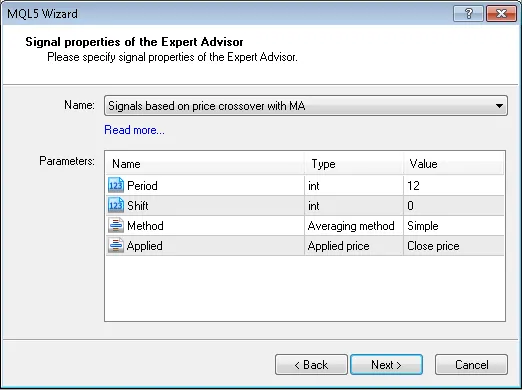
Figure 2. Choose 'Signals based on price crossover with MA' in MQL5 Wizard
Next, you’ll need to specify the desired trailing stop algorithm and a suitable money and risk management system. The Expert Advisor’s code will be generated automatically, and you can compile and test it in the Strategy Tester within the MetaTrader 5 client terminal.
Testing Results
Let’s take a look at the backtesting results of our Expert Advisor using historical data (EURUSD H1, period: 01.01.2010-05.01.2011, MA_period=12, MA_Shift=0).
For this Expert Advisor, we opted for a fixed volume (Trading Fixed Lot, 0.1) and did not utilize a Trailing Stop algorithm (Trailing not used).
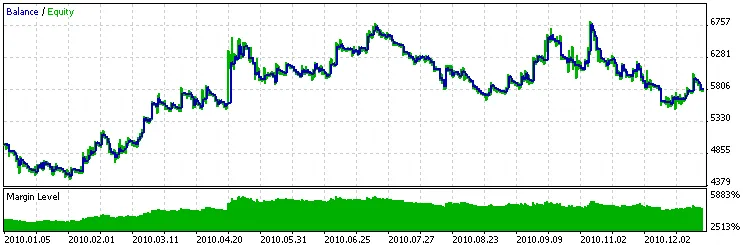
Figure 3. Historical backtesting results of the Expert Advisor based on price crossover with MA
Attachments: The SignalMA.mqh file containing the CSignalMA class (found in the MQL5 Standard Library) can be accessed at MQL5\Include\Expert\Signal. The crossoverma.mq5 file contains the code for the Expert Advisor that you generated using MQL5 Wizard.




Comments 0