
If you’re looking to sharpen your trading strategies, the Exp_LSMA_Angle Expert Advisor (EA) for MetaTrader 5 might just be the tool you need. This system utilizes the LSMA_Angle histogram to identify breakthroughs at overbought and oversold levels, providing you with timely entry and exit signals.
The magic happens at the close of each bar: when the price breaks through the set levels, the EA generates a position opening signal. Likewise, a breakthrough of the zero level triggers a closing signal. This systematic approach can help you make informed trading decisions without second-guessing.
To get started, you’ll need to ensure that the compiled indicator file LSMA_Angle.ex5 is in place. Simply drop it into your <terminal_data_folder>\MQL5\Indicators directory, and you’re good to go!
One notable feature of this EA is its compatibility with brokers offering non-zero spreads. Thanks to the TradeAlgorithms.mqh library, you can also set your Stop Loss and Take Profit when opening positions. If you want to explore more options, check out the Trade Algorithms library for additional variants.
During the testing phase, we utilized the default parameters for the EA, and it’s worth noting that neither Stop Loss nor Take Profit was employed in those tests.
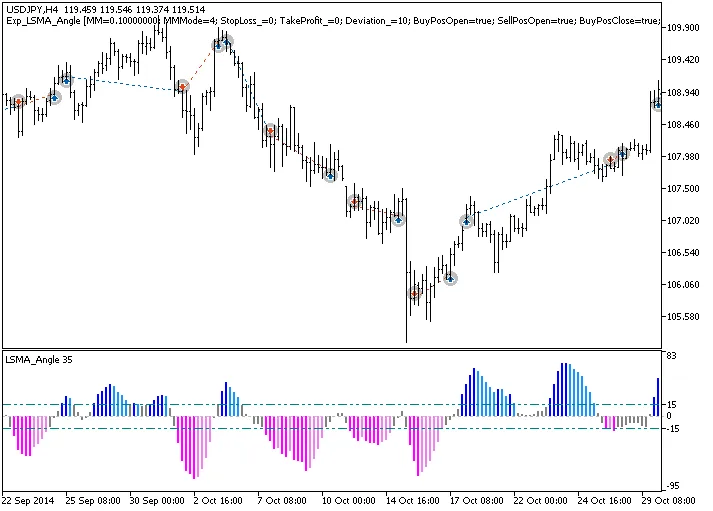
Fig.1. Examples of deals on the chart
Looking at the testing results for the USDJPY on the H4 timeframe in 2014, we see some promising outcomes:
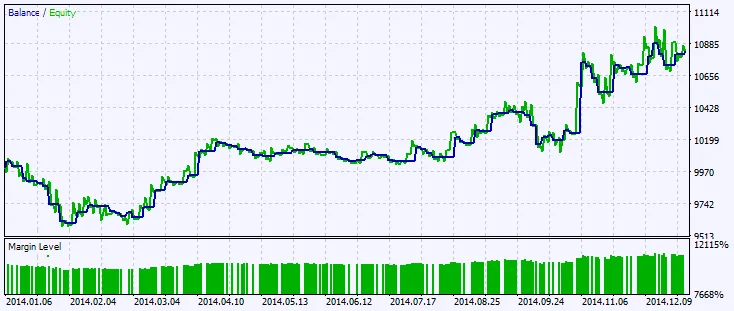
Fig.2. Testing results chart




Comments 0