
Trading Strategy
After a losing trade, the MT45 EA jumps back in with a larger lot size for the next trade. It kicks things off with a Buy order; from there, it alternates between buying and selling. The EA opens positions at the start of each candlestick.
Following a Stop Loss, the EA ramps up the lot size by a KL coefficient until it hits the maximum lot size, ML. Once it reaches that cap, it resets back to the initial lot size, LT.
This strategy is tailored for the EURUSD pair on the H1 timeframe and has been optimized over the period from January 11, 2014, to September 9, 2017.
Expert Advisor Settings
inputint Stop = 600; // Stop Lossinputint Take = 700; // Take Profitinputint Slip = 100; // Slippageinputint MN = 123; // Magicinputdouble LT = 0.01; // Lotinputdouble KL = 2; // Lot increase ratioinputdouble ML = 10; // Maximum lot
Features
This EA comes with a cross-platform mode powered by preprocessor directives. Here’s how the Martingale function works:
//+------------------------------------------------------------------+//|                                                                  |//+------------------------------------------------------------------+double Lot()
  {
   double lot=LT;
//---  MQL4#ifdef __MQL4__
   if(OrderSelect(OrdersHistoryTotal()-1,SELECT_BY_POS,MODE_HISTORY))
     {
      if(OrderProfit()>0) lot=LT;
      if(OrderProfit()<0) lot=OrderLots()*KL;
     }
#endif//---  MQL5#ifdef __MQL5__
   if(HistorySelect(0,TimeCurrent()))
     {
      double profit=HistoryDealGetDouble(HistoryDealGetTicket(HistoryDealsTotal()-1),DEAL_PROFIT);
      double LastLot=HHistoryDealGetDouble(HistoryDealGetTicket(HistoryDealsTotal()-1),DEAL_VOLUME);
      if(profit>0) lot=LT;
      if(profit<0) lot=LastLot*KL;
     }
#endif

   if(lot>ML)lot=LT;
   return(lot);
  }
Backtests
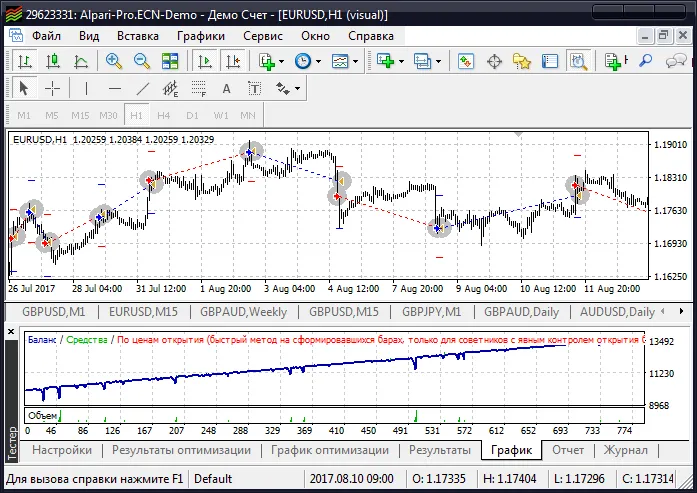
Check out the performance on the MetaTrader 4 terminal:
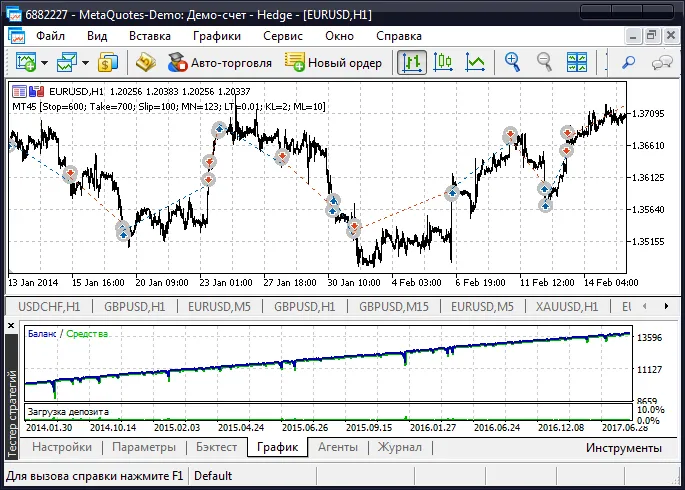
And here’s how it looks on the MetaTrader 5 terminal:
Tips
- It’s best to use this EA as a foundation for crafting your own trading strategy.




Comments 0