
Welcome to the world of trading! If you're just starting out, you might have heard about the MACD indicator. It's a powerful tool that can help you make sense of market trends and make more informed trading decisions.
Before we dive in, I want to apologize for the confusion regarding the MACD code that was previously mentioned. Unfortunately, it's no longer available, and I'm not sure how to hide it from the codebase. But don't worry; we're here to learn about the MACD itself!
What is MACD?
The Moving Average Convergence Divergence (MACD) is a trend-following momentum indicator that shows the relationship between two moving averages of a security's price. It's a favorite among traders for spotting potential buy and sell signals.
How to Set Up MACD on MetaTrader 5
Follow these simple steps to get the MACD indicator running on your MetaTrader 5 platform:
- Open your MetaTrader 5 application.
- Go to the 'Insert' menu, select 'Indicators', then choose 'Trend', and finally click on 'MACD'.
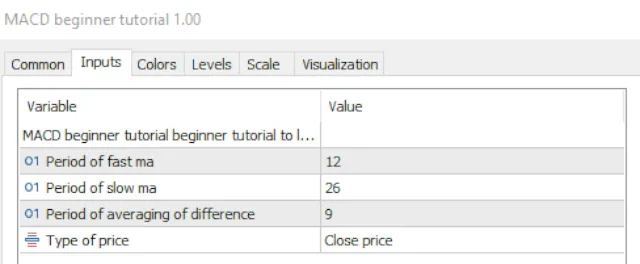
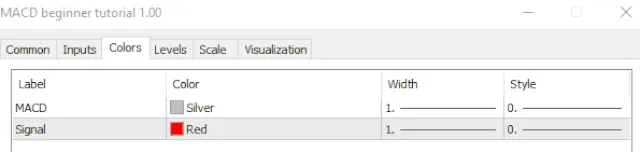
- Adjust the settings as per your trading style (the default settings are a good starting point).
- Click 'OK', and voilà! Your MACD indicator will appear on your chart.
Understanding the MACD Components
Once you have the MACD on your chart, you'll notice three key components:
- MACD Line: The difference between the 12-period and 26-period exponential moving averages (EMAs).
- Signal Line: A 9-period EMA of the MACD Line, which acts as a trigger for buy and sell signals.
- Histogram: The difference between the MACD Line and the Signal Line, providing visual insight into the strength of the momentum.
In closing, mastering the MACD can provide you with a significant edge in your trading journey. So, take some time to practice with it on your demo account before diving into live trades!





Comments 0