
ChannelEA1 is a nifty little system trading tool designed to work seamlessly with the ChannelInd indicator. The best part? You don't actually need the indicator for it to function since all the necessary calculations are handled directly within the EA.
This EA trades on a set schedule. Based on the trading times you specify in the settings, it places two pending limit orders at the edges of the channel and sets Take Profit levels on the opposite side—without a Stop Loss. Once the trading period wraps up, all open positions are closed, and any untriggered orders are wiped clean.
ChannelEA1 comes with eight customizable input parameters:
- Begin Hour - when your trading session kicks off
- End Hour - when your trading session wraps up
- Expert's Magic Number - a unique ID for the EA's trades
- Lots - the trade volume you want to open
- Price Slippage - the maximum slippage you’re willing to accept when opening trades
- Spread Multiplier for Stops - a multiplier used to determine the proper distance for stop orders (*).
- Wait Time for Environment Update (in seconds) - how long to wait for the trading environment to refresh (**)
- Attempts to Get Environment State - how many tries to get an accurate read on the trading environment (***)
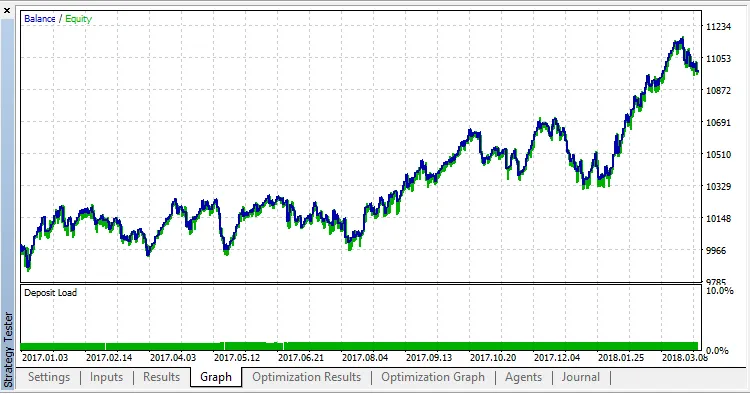
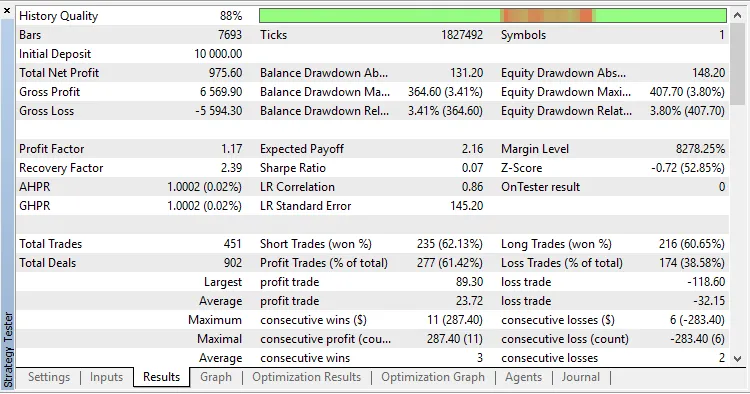
To evaluate the strategy, we ran tests with default settings using data from January 2, 2017, to March 29, 2018. Unfortunately, the EA didn’t perform well with these default settings. So, we optimized the trading start and end parameters (Begin Hour and End Hour) specifically for EURUSD on an H1 chart in the 1-minute OHLC mode. The results were much more promising this time:




Comments 0