
Welcome to our latest blog post where we dive into a fantastic trading system that utilizes the DynamicRS_C indicator.
So, how does it work? A trade decision is triggered whenever there’s a shift in the direction of the indicator's movement. It’s a straightforward yet effective approach!
For this Expert Advisor (EA) to function correctly, make sure you place the compiled indicator file, Exp_DynamicRS_C.ex5, in your terminal's data folder under MQL5/Indicators.
One thing to keep in mind is that the TradeAlgorithms.mqh library file is essential for using Expert Advisors with brokers that offer a non-zero spread. This library also enables you to set your Stop Loss and Take Profit levels right when you open a position. If you want more options, you can check out various versions of the library here: Trade Algorithms.
The default input parameters for our Expert Advisor were employed during the testing shown below, and it’s worth noting that neither Stop Loss nor Take Profit were utilized in these tests.
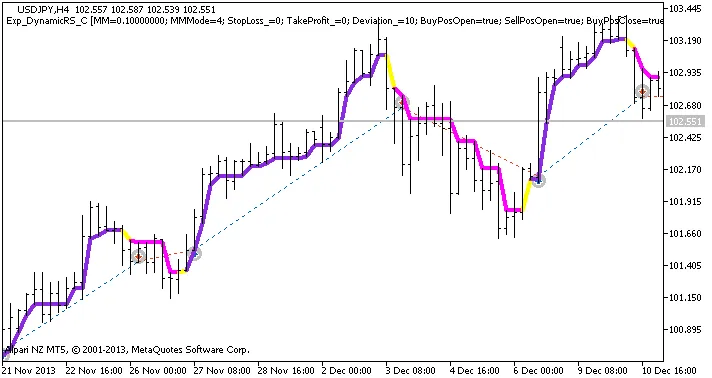
Figure 1. The instances of history of deals on the chart.
Let’s take a look at the testing results for the year 2013 on the USDJPY H4 timeframe:
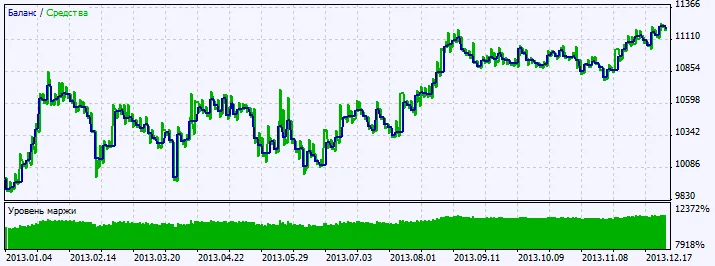
Figure 2. Chart of testing results.




Comments 0