
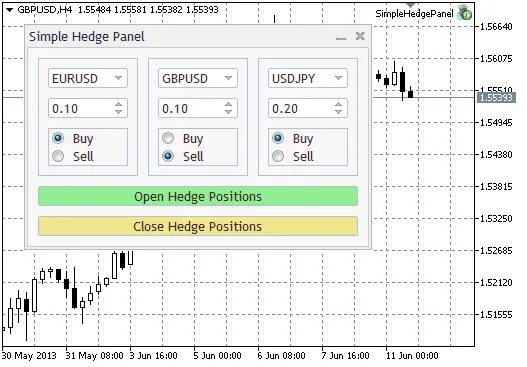
The Simple Hedge Panel is your go-to tool for manual trading, enabling you to open and close positions across multiple instruments with ease. It’s designed with just the essentials, including symbols, volumes, and position directions. Here’s what you need to keep in mind while using the panel:
- It doesn’t matter which symbol chart you attach the panel to; it works seamlessly with all symbols available in the Market Watch. Initially, the default value in the panel boxes is set to "Select", meaning no symbol is chosen.
- Positions will only open or close when a symbol is selected. If the symbol value in the boxes is still "Select", any button presses for opening or closing positions will be ignored.
- Switching symbols automatically recalculates lot parameters, setting the minimum and maximum lot values for the selected symbol, along with the default value and the minimum change step (both set to ten times the size of the minimal lot).
- Note that volume and order direction fields are only required for opening positions!
- To close a position, if there’s an open position on the selected symbol, it will close regardless of the specified volume or direction. The entire position will be closed.
*In this context, a box refers to an object containing the fields for the symbol, volume, and direction needed to open a single position. The panel consists of a set number of boxes and buttons for managing positions.
Parameters:
Boxes - This indicates how many boxes are present in the panel, or in other words, how many symbols you can manage at once. You can set this number from 1 to 5. If you choose a value outside this range, the panel will default to two boxes.
Setup:
To set it up, unzip the SimpleHedgePanel archive into your terminal_data_folder/MQL5/Experts. Then, navigate to the folder you just created (SimpleHedgePanel) and compile the files.
Tips:
- If you need to close a portion of a position, you can open new trades in the opposite direction to partially close it.
- For instance, if you have open positions on four symbols and want to close positions on just two, set the boxes of the symbols you wish to keep open to "Select". Those positions will remain untouched.




Comments 0