
Hey fellow traders! Today, let's dive into the Exp_CandlesticksBW_Tm Expert Advisor designed specifically for MetaTrader 5. This EA harnesses the power of color changes in the CandlesticksBW indicator to help you pinpoint perfect trading moments.
What’s cool about this EA is its ability to define strict trading time intervals. It generates a trade signal whenever a bar closes and the indicator's color shifts, signaling a potential trend change. Talk about catching the wave at the right time!
With the input parameters, you can easily set your desired trading hours:
inputbool TimeTrade=true; // Enable trading during specified time intervalsinput HOURS StartH=ENUM_HOUR_0; // Trading start hourinput MINUTS StartM=ENUM_MINUT_0; // Trading start minuteinput HOURS EndH=ENUM_HOUR_23; // Trading end hourinput MINUTS EndM=ENUM_MINUT_59; // Trading end minute
You can set specific hours and minutes for both the start and end of your trading session. By default, this EA will trade from midnight (0:00) to 23:59, closing all open positions at the end of the day.
Now, if you set the start time to be later than the end time, the EA will automatically close any open trades the next day at the designated time. It’s all about keeping your trading schedule in check!
To get this EA up and running, make sure the compiled CandlesticksBW.ex5 indicator file is placed in your <terminal_data_directory>\MQL5\Indicators folder. It’s essential for the EA to function properly.
In the tests below, we used the EA's default settings. Notably, we didn’t employ Stop Loss or Take Profit orders, just to see how it performs under standard conditions.
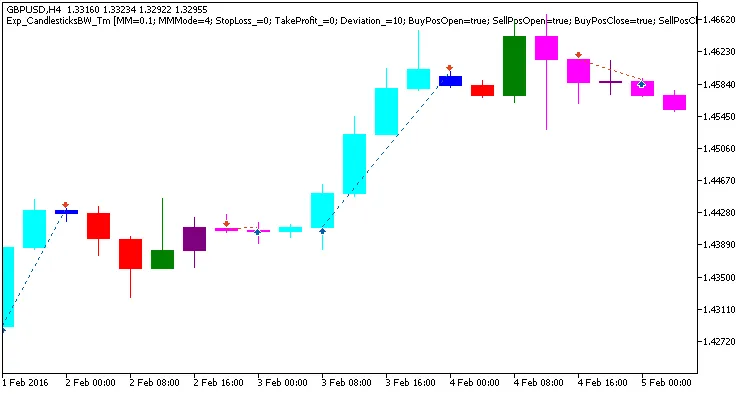
Fig.1. Example trades on the chart
Let’s take a look at the testing results for GBPUSD on the H4 timeframe throughout 2016:
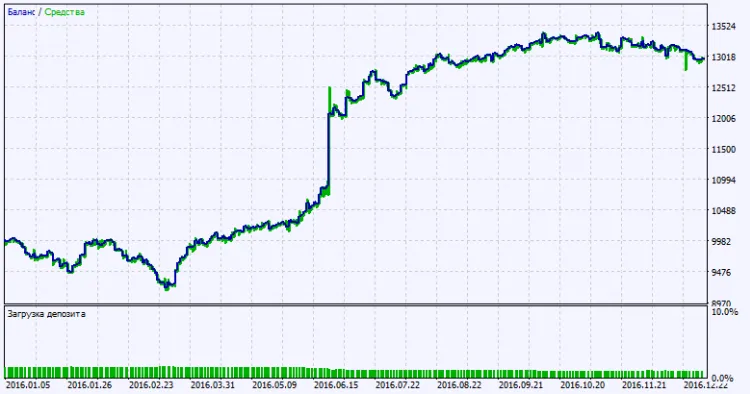
Fig.2. Testing results chart




Comments 0