
Hey there, fellow traders! Today, we're diving into the Exp_ColorMETRO_MMRec_Duplex, a powerful trading system designed for MetaTrader 5. This system boasts two identical setups for both long and short trades, all based on the reliable ColorMETRO indicator. What sets this EA apart is its capability to adjust trade volumes based on the outcomes of previous trades, making it a versatile tool in your trading arsenal.
The Exp_ColorMETRO_MMRec_Duplex is an evolution of the Exp_ColorMETRO_Duplex, specifically developed to allow changes in the volume of open positions. Here’s a quick look at the key input blocks added for this purpose:
inputuint    L_TotalMMTriger=5;    // Last 5 Buy trades to calculate stop loss
inputuint    L_LossMMTriger=3;    // Number of losing Buy trades to reduce MM
inputdouble  L_SmallMM=0.01      // Deposit share for losing trades
inputdouble  L_MM=0.1            // Deposit share for normal trading
input MarginMode L_MMMode=LOT;      // Lot setting mode
Similarly, here’s the setup for the short trades:
inputuint    S_TotalMMTriger=5;    // Last 5 Sell trades to calculate stop loss
inputuint    S_LossMMTriger=3;    // Number of losing Sell trades to reduce MM
inputdouble  S_SmallMM=0.01      // Deposit share for losing trades
inputdouble  S_MM=0.1            // Deposit share for normal trading
input MarginMode S_MMMode=LOT;      // Lot setting mode
With these settings, if you find that out of the last five trades, three are losses in the same direction, the EA will open the next trade with a volume of 0.01 lots. If less than three trades are losers, it will go with a volume of 0.1 lots. This clever adjustment helps to manage risk effectively.
To get the Expert Advisor up and running, you’ll need to place the compiled ColorMETRO.ex5 indicator files in the following directory: <terminal_data_directory>\MQL5\Indicators.
For the tests below, we used the default input parameters of the EA. Notably, Stop Loss and Take Profit settings were not included in the testing process.
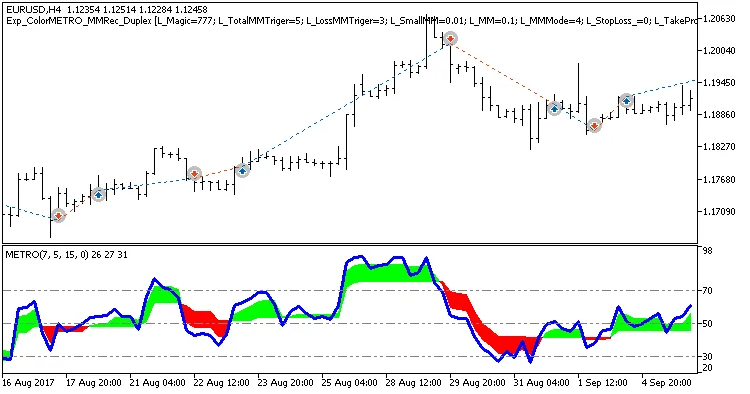
Fig.1. Examples of deals on the chart with symmetrical settings.
Looking at the backtesting results for EUR/USD on the H4 timeframe for 2017, we can see how well this EA performs:
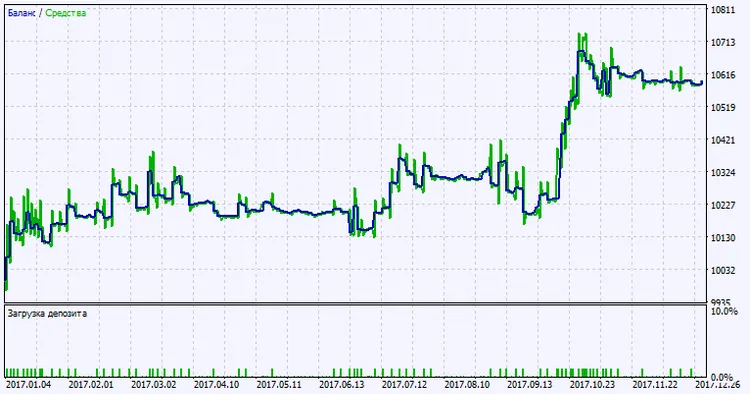
Fig.2. Testing results chart.




Comments 0