
If you're diving into automated trading, the Exp_EMA-Crossover_Signal EA is a fantastic tool to add to your arsenal. This Expert Advisor operates based on signals generated by the EMA-Crossover_Signal semaphore indicator, making it a solid choice for those who rely on technical analysis.
So, how does it work? A trade signal is triggered when a bar closes, and a new colored indicator rhombus pops up on your chart. This visual cue can help you make informed trading decisions.
To get started, ensure you have the EMA-Crossover_Signal.ex5 indicator file. You’ll need to place it in your <terminal_data_folder>\MQL5\Indicators directory for the EA to function correctly.
One thing to keep in mind is that the TradeAlgorithms.mqh library file allows you to use Expert Advisors even with brokers that offer a non-zero spread. Plus, it enables you to set Stop Loss and Take Profit right when you open a position, giving you more control over your trades. You can find additional versions of this library by checking out this link: Trade Algorithms.
The default input parameters for the Expert Advisor were used during the tests shown below, without applying Stop Loss or Take Profit.
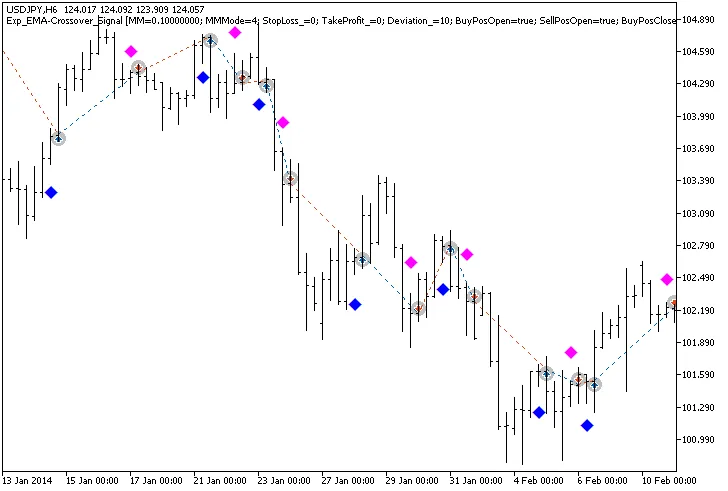
Fig.1. Trade examples on the chart
Now, let's take a look at the testing results for 2014, specifically on the USDJPY H6:
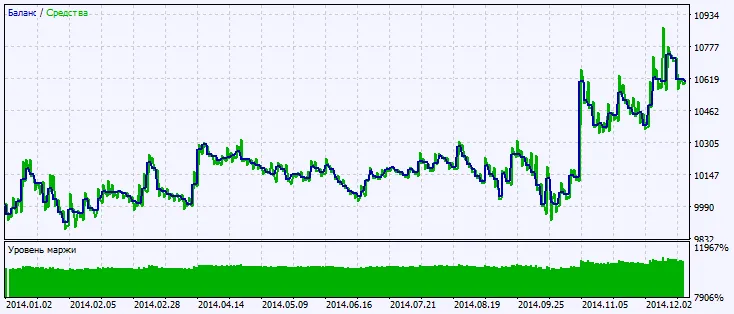
Fig.2. Testing results chart




Comments 0