
Hey there, fellow traders! Today, we're diving into a trend strategy that’s as simple as a traffic light—using moving averages to guide our trading decisions. This Expert Advisor (EA) is designed to help you backtest the strategy and fine-tune your parameters for optimal performance.
The heart of this strategy revolves around a single indicator—the Moving Average, with five distinct settings to keep an eye on:
- Red — period 120, method Simple, applied to Close;
- Yellow — period 55, method Simple, applied to Close;
- Green — period 5, method Exponential, applied to Close;
- Blue dotted — period 24, method Exponential, applied to High;
- Brown dotted — period 24, method Exponential, applied to Low.
Here’s the scoop on how to interpret the signals:
- The Buy signal pops up when the moving averages align in this order from top to bottom: Green – Yellow – Red.
- The Sell signal occurs when the indicators reverse: Red – Yellow – Green.
Additionally, you want to look for price action that breaks outside the corridor between the blue and brown dotted moving averages.
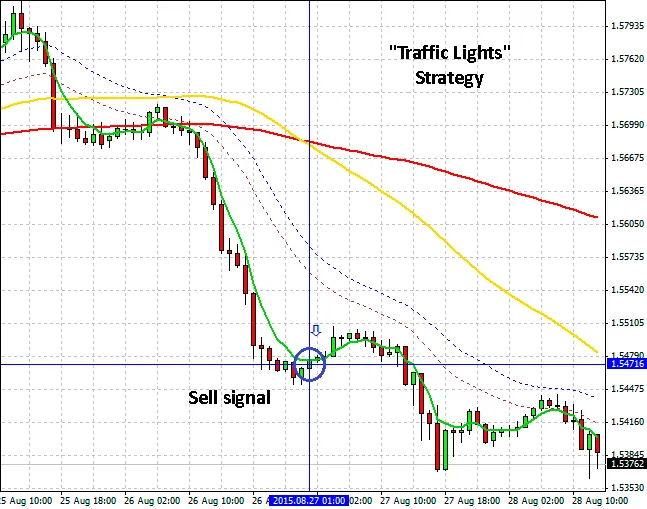
Sell Signal
This EA operates according to the strategy you set. You can establish your Take Profit and Stop Loss parameters right from the get-go. You have two options for opening trades: either when all signals align on the current candlestick or at the start of the next one, controlled by the TimeOpenBar parameter. Trades can be closed via Take Profit, Stop Loss, or when the green and yellow moving averages cross each other, based on the CloseProfit parameter.
Keep in mind that how you set the event triggering—whether at the current candlestick or after it closes—significantly impacts the testing quality. Until that candlestick closes, the moving averages can shift, leading to potential false signals.
The




Comments 0