
Hey there, fellow traders! Are you ready to take your trading game to the next level? Let’s dive into how to use the TrendMeLeaveMe Expert Advisor (EA) for MetaTrader 4. This tool can really simplify your trading strategy!
Setting Up Your Trend
Before you kick off the EA, you need to draw your trend lines—either Trend Up or Trend Down. Once that’s done, set your properties, fire up the expert, and then you can sit back, relax, or get on with your day!
Understanding How It Works
Now, here’s the catch: this expert doesn’t operate on autopilot. You have to manually draw the trend lines—label them as buystop for upward trends or sellstop for downward trends. You’ll also need to configure the following settings:
- BuyStop_StepUpper
- BuyStop_StepLower
- SellStop_StepUpper
- SellStop_StepLower
Once the price enters the area between your buystop trend and BuyStop_StepLower, the EA will execute a buystop order at the price defined by BuyStop_StepUpper. Similarly, when the price hits the area between your sellstop trend and SellStop_StepUpper, the EA will place a sellstop order at the price indicated by SellStop_StepLower.
Modifying Orders
This EA is smart! It will continuously adjust the OpenPrice for both orders as the price trends in your favor, until it exits the previous area. This feature helps you stay in the game longer!
Setting Stop Loss and Take Profit
You can also customize your risk management by setting:
- BuyStop_StopLoss, BuyStop_TakeProfit, and BuyStop_Lot for buystop
- SellStop_StopLoss, SellStop_TakeProfit, and SellStop_Lot for sellstop
This way, you can control your exposure and maximize potential profits!
Visual Examples
To give you a clearer picture, check out these charts:
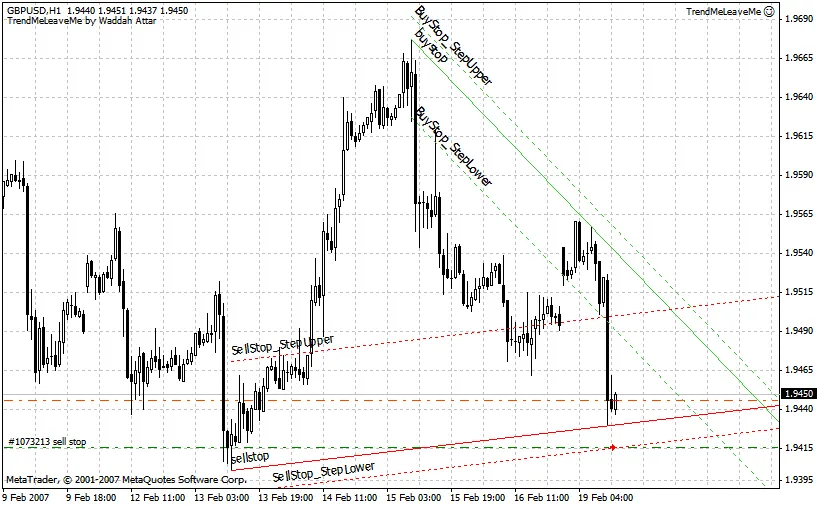
Here’s another example: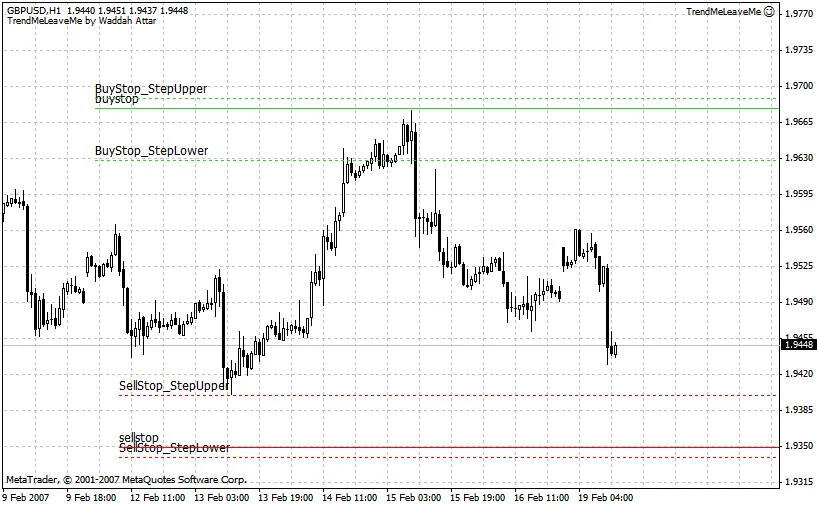




Comments 0