
Hey traders! Today, we're diving into the fascinating world of the Vortex Indicator and how you can leverage it through a powerful Expert Advisor (EA) designed for MetaTrader 5. This EA seamlessly supports both long and short trading strategies, giving you the flexibility you need to navigate the markets.
Understanding the Dual Trading Systems
This EA features two identical trading systems that cater to long and short positions, all based on the signals from the Vortex Indicator. You can customize these systems independently, allowing for a tailored trading experience. The input parameters are conveniently divided into two groups:
- Long Position Parameters: These parameters start with 'L' and help manage your long trades.
- Short Position Parameters: These start with 'S' and control your short trades.
Setting Up Your EA
To illustrate how the EA works, let’s take a look at some essential input parameters:
//+----------------------------------------------+//| EA inputs for long operations |//+----------------------------------------------+inputuint L_Magic=777; // L magic numberinputdouble L_MM=0.1; // L share of a deposit in a dealinput MarginMode L_MMMode=LOT; // L lot size calculation method
//+----------------------------------------------+//| EA inputs for short operations |//+----------------------------------------------+inputuint S_Magic=555; // S magic numberinputdouble S_MM=0.1; // S share of a deposit in a dealinput MarginMode S_MMMode=LOT; // S lot size calculation method
Each trading system uses a unique magic number, ensuring they operate independently. It's essential to remember that market dynamics are rarely symmetrical. Often, you'll need different parameters for trading in uptrends versus downtrends. So, it's a good idea to start by testing one system at a time. Disable the other system using the relevant switches to fine-tune your settings.
inputbool L_PosOpen=true; // Permission to enter long positionsinputbool L_PosClose=true; // Permission to exit long positions
Once you've got the long system set up, repeat the same process for the short system.
Getting Your EA Up and Running
Don't forget, for the EA to function properly, you need to have the compiled VortexIndicator.ex5 file in your <terminal_data_directory>\MQL5\Indicators folder.
During testing, we utilized the default input parameters, and it’s worth noting that we didn’t apply Stop Loss or Take Profit settings during these tests.
Testing Results
Here are some testing results for the year 2017 on the EURJPY H12 chart:
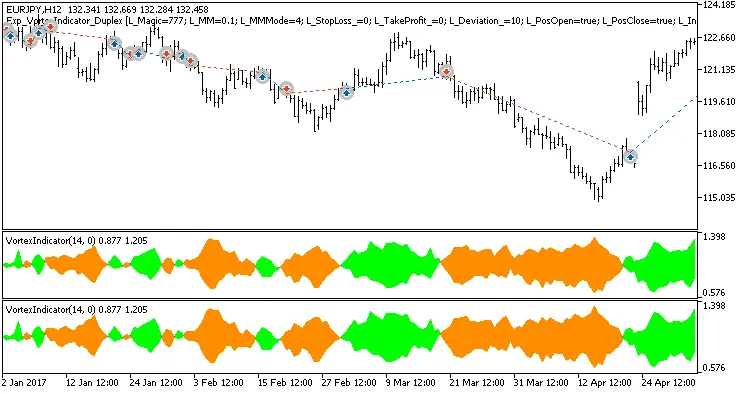
Fig. 1. Examples of deals on the chart with symmetrical settings
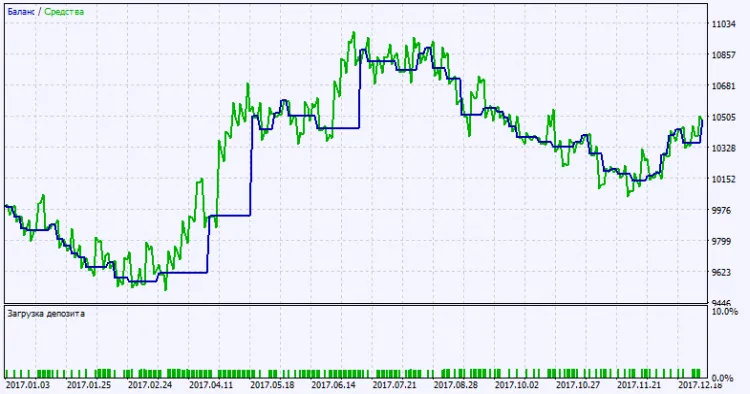
Fig. 2. Testing results chart
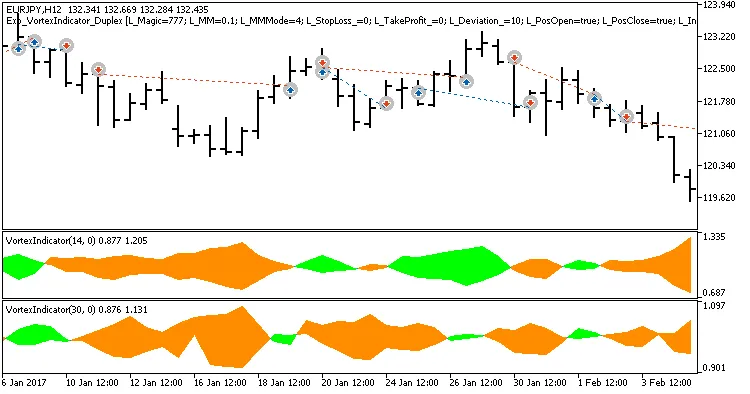
Fig. 3. Examples of deals on the chart with non-symmetrical settings
That’s a wrap for today! Remember, the key to successful trading with the Vortex Indicator EA lies in understanding how to optimize each system for the current market conditions. Happy trading!




Comments 0