
If you're looking to elevate your trading game, the Exp_PercentageCrossover Expert Advisor is a fantastic option worth considering. This EA utilizes the PercentageCrossover color changes to generate trade signals while allowing you to set specific trading time intervals.
Here's how it works: a trade signal is triggered whenever a bar closes and the direction of the indicator (its color) shifts.
Setting Your Trading Time
You can customize your trading hours by adjusting the input parameters. Here's a quick look at how to set it up:
inputbool TimeTrade=true; //Enable trading during specified hoursinput HOURS StartH=ENUM_HOUR_0; //Start trading hourinput MINUTS StartM=ENUM_MINUT_0; //Start trading minuteinput HOURS EndH=ENUM_HOUR_23; //End trading hourinput MINUTS EndM=ENUM_MINUT_59; //End trading minute
You'll have two variables for the start time and two for the end time, giving you flexibility to manage your trades effectively.
With the default settings, the EA will trade throughout the entire session from 00:00 to 23:59, automatically closing all positions at the end of the day. If your start time is set later than your end time, don't worry—the EA will close your positions the next day at the specified hour.
Installation Details
To get the Exp_PercentageCrossover working smoothly, make sure to save the TotalPowerIndicatorX.ex5 compiled indicator file in your <terminal_data_folder>\MQL5\Indicators directory.
It's worth noting that the TradeAlgorithms.mqh library file is compatible with brokers offering nonzero spreads and allows you to set Stop Loss and Take Profit during trade openings. For more variations of this library, check out the following link: Trade Algorithms.
During our tests, we used the default input parameters for the Expert Advisor, without applying Stop Loss and Take Profit. Here’s a look at the results:
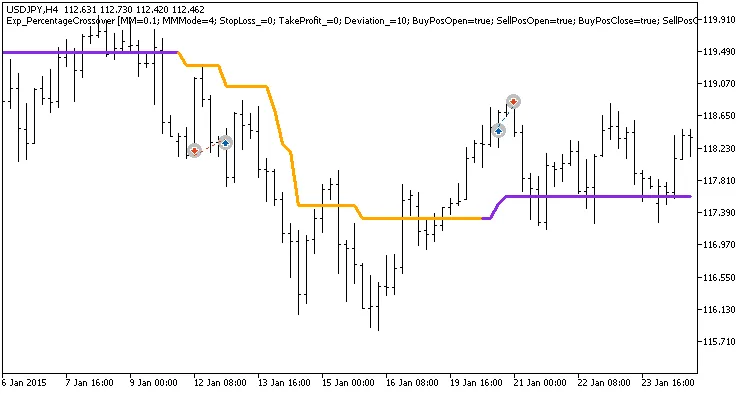
Fig. 1. Examples of deals on the chart
Testing results for 2015 on the USDJPY H4 pair:
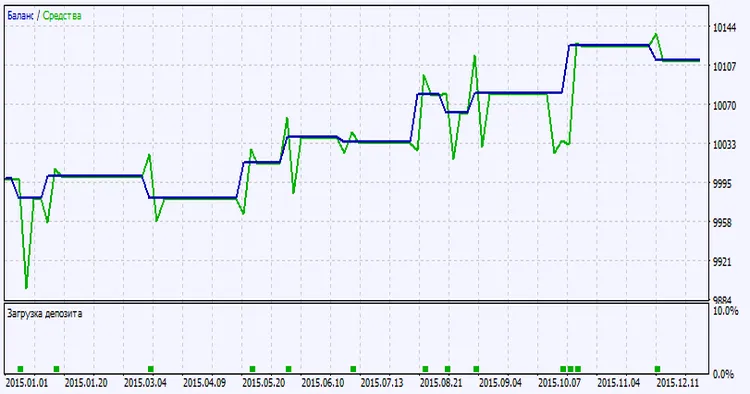
Fig. 2. Testing results chart




Comments 0