
If you're looking to amp up your trading game, you've come to the right place! Today, we're diving into how to use the XRVI indicator within MetaTrader 5 to spot trading opportunities.
Understanding the XRVI Indicator
The XRVI is a powerful trading system that generates signals at the close of each bar. You'll want to watch for when the oscillator crosses its signal line – that’s your cue to make a move!
Getting Started with the XRVI in MT5
To start using the XRVI, simply place the XRVI.ex5 file into your terminal_data_folder\MQL5\Indicators. This is where all your custom indicators hang out.
Testing the Expert Advisor
In our recent tests, we used the default input parameters for the Expert Advisor. It's worth noting that during these tests, we didn't implement Stop Loss or Take Profit settings. This helps us see the raw potential of the indicator.
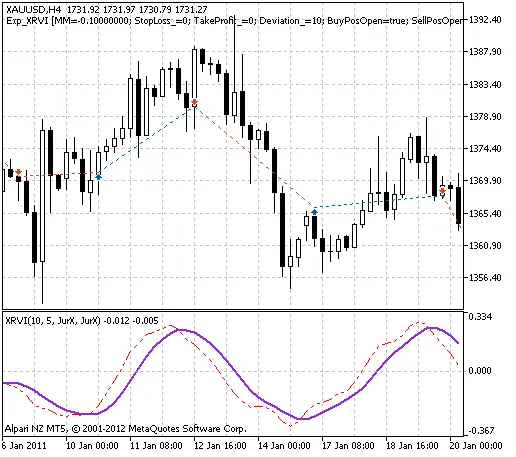
Fig. 1. The instances of history of deals in the chart
Performance Results for XAUUSD in 2011
Let’s take a quick look at the testing results from 2011 on the XAUUSD pair, specifically on the H4 timeframe:
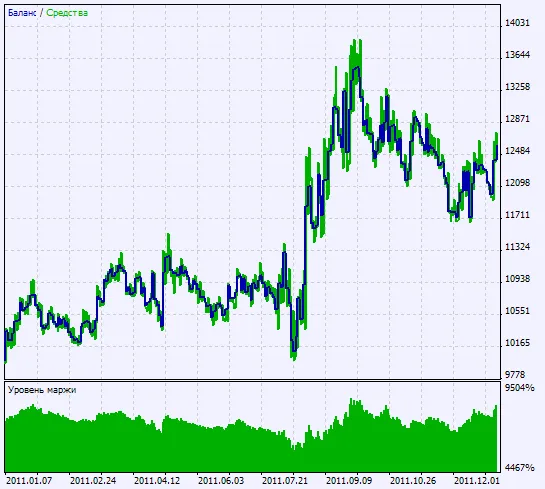
Fig. 2. Chart of testing results
By utilizing the XRVI, you can gain a competitive edge in your trading strategies. So, why not give it a shot and see how it can work for you?




Comments 0