
If you're looking to enhance your trading strategy, the Exp_CronexAC EA could be a game changer for you. This Expert Advisor is designed to work seamlessly with the CronexAC oscillator, providing you with signals that can help you make informed trading decisions.
How does it work? The EA generates signals based on color changes in the indicator's cloud when a bar closes. It's a straightforward approach that many traders find effective.
To get started, make sure to place the compiled indicator file, CronexAC.ex5, in your terminal_data_folder\MQL5\Indicators. This will ensure that your EA operates smoothly.
One important thing to note is that the TradeAlgorithms.mqh library file allows you to utilize Expert Advisors with brokers that offer nonzero spreads. Plus, it gives you the flexibility to set your Stop Loss and Take Profit while opening positions. If you want to explore more options, you can find additional variants of the library here: Trade Algorithms.
The default input parameters for this EA were applied during the testing phase highlighted below. For clarity, Stop Loss and Take Profit were not utilized during these tests.
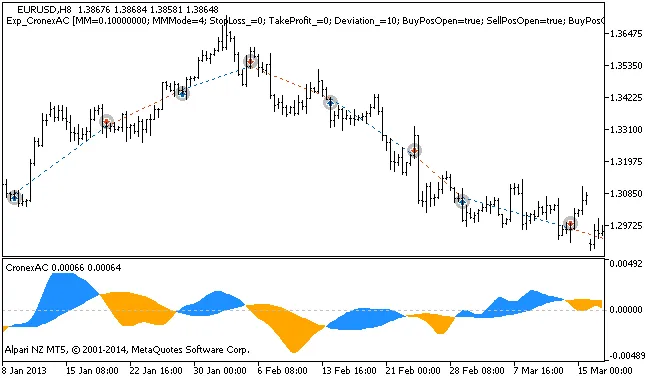
Figure 1: A glimpse into the history of deals on the chart
As for the testing results for 2013 on the EURUSD H8 timeframe, the outcomes speak for themselves:
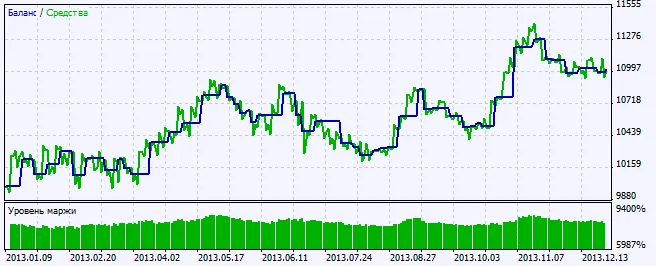
Figure 2: Overview of testing results




Comments 0