
Hey fellow traders! Today, I want to share with you an exciting trading system that utilizes the ColorMETRO Stochastic indicator. This system generates signals when a bar closes and there’s a shift in the cloud color, making it a handy tool for your trading arsenal.
To get started with this Expert Advisor (EA), you'll need to have the compiled indicator file ColorMETRO_Stochastic.ex5. Just drop this file into your terminal's data directory at MQL5\Indicators, and you’re good to go!
One thing to note is that the TradeAlgorithms.mqh library file is essential for using EAs with brokers that provide a nonzero spread. This library also lets you set your Stop Loss and Take Profit levels right when you open a position. If you’re interested in exploring more options, check out the Trade Algorithms library.
For the tests below, we used the default input parameters for the Expert Advisor. It’s worth mentioning that neither Stop Loss nor Take Profit settings were applied during these tests.
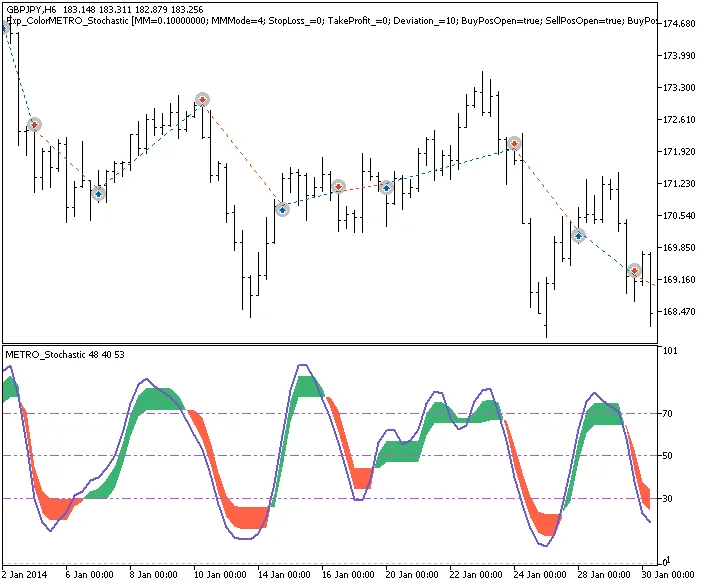
Fig. 1. Trade examples on the chart
Let’s take a look at how this EA performed in testing results for 2014 with the GBPJPY on an H6 timeframe:
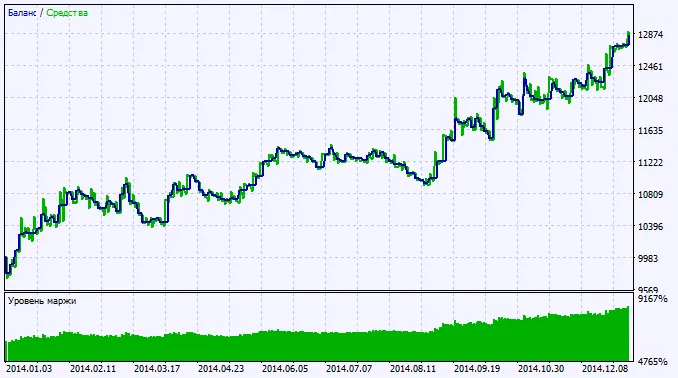
Fig. 2. Chart of testing results




Comments 0