
Hey traders! Today, let's dive into a powerful trading system that revolves around the MFI Histogram indicator. This Expert Advisor (EA) generates trade signals right at the close of a bar when the histogram changes color from a neutral gray to a vibrant yellow or lime. This shift indicates that the MFI oscillator has entered either the overbought or oversold zone, giving you a prime opportunity to make your move.
To get started, you'll need the compiled indicator file MFI_Histogram.ex5. Make sure you save this file in your <terminal_data_folder>/MQL5/Indicators directory to ensure it runs smoothly.
It's also important to note that the TradeAlgorithms.mqh library file is essential for using EAs with brokers that offer nonzero spreads. This library allows you to set your Stop Loss and Take Profit right at the position opening. Want more options? Check out additional variants of the library right here: Trade Algorithms.
For the tests shown below, we relied on the default input parameters of the EA. Keep in mind that we did not utilize Stop Loss or Take Profit settings during these tests.
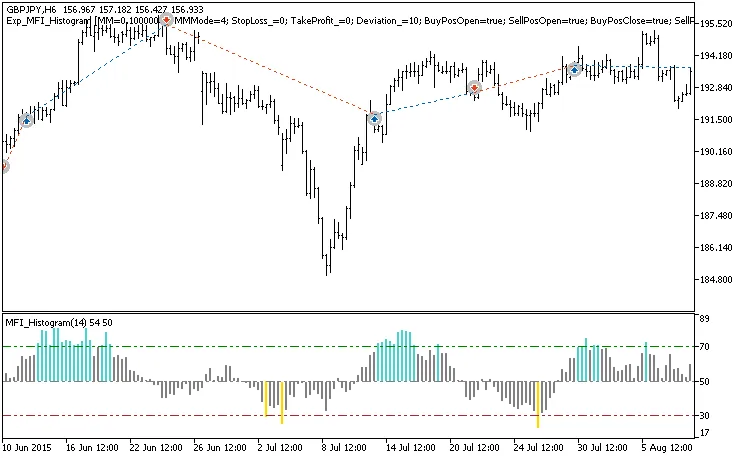
Fig. 1. Examples of trades on the chart
Now, let's take a look at the testing results from 2015 on the GBPJPY H6 pair:
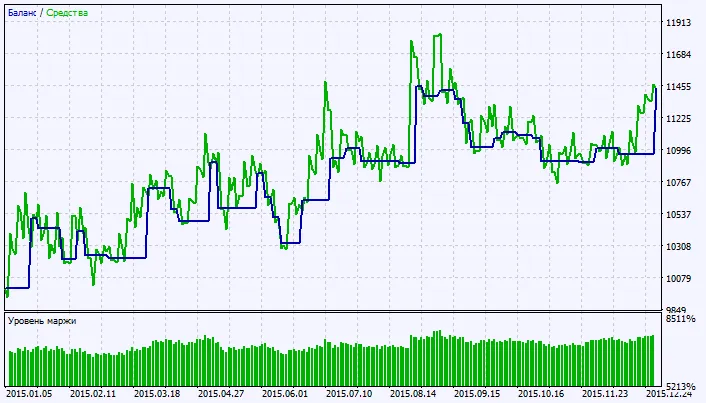
Fig. 2. Chart of testing results




Comments 0