
Are you ready to take your trading to the next level? Meet the Exp_Stalin, a powerful trading system designed for MetaTrader 5. This Expert Advisor (EA) generates signals based on the reliable Stalin indicator. You’ll receive a trading signal at the close of a bar whenever a colored arrow appears on your chart.
To get started, you’ll need to download and install the Stalin.ex5 indicator file. Just save it to your <terminal_data_folder>\MQL5\Indicators directory, and you’re all set!
One thing to keep in mind is that the TradeAlgorithms.mqh library file is essential for using Expert Advisors with brokers that offer nonzero spreads. This library also allows you to set your Stop Loss and Take Profit right when you open a position. If you want to explore more options, check out the Trade Algorithms link for additional library variants.
During testing, we used the default input parameters for the Expert Advisor, and we did not implement Stop Loss and Take Profit settings. Below, you can see the results of our testing.
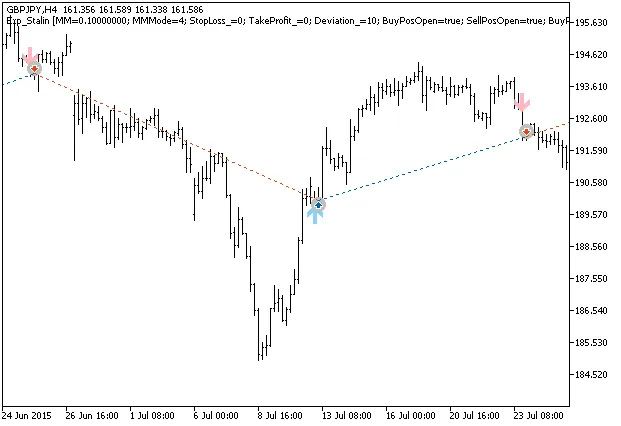
Fig. 1. Examples of trades on the chart
Here’s a look at our testing results for 2015 on the GBPJPY H4 pair:
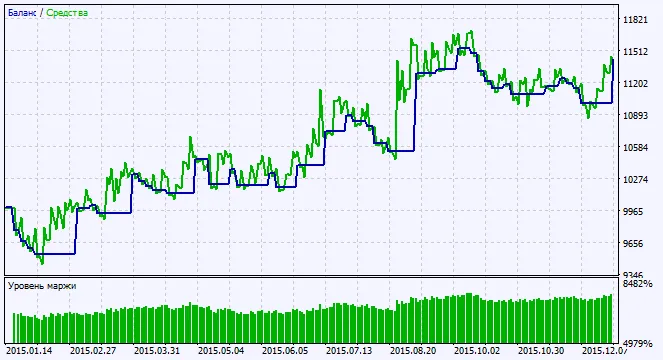
Fig. 2. Chart of testing results




Comments 0