
If you're diving into the world of trading, the Volume Weighted MA Expert Advisor (often referred to as the VWMA EA) is a tool you won't want to overlook. This EA operates by analyzing the Volume Weighted MA indicator, providing signals based on changes in the indicator's color as a bar closes.
To get this EA up and running, you'll need the compiled indicator file Volume_Weighted_MA.ex5. Just pop it into your <terminal_data_folder>\MQL5\Indicators directory, and you'll be good to go.
One thing to keep in mind is that the TradeAlgorithms.mqh library file is essential for using Expert Advisors with brokers that offer a nonzero spread. This library also allows you to set Stop Loss and Take Profit levels at the same time you open a position. If you're looking for more variations of this library, you can check out the link here: Trade Algorithms.
For the tests shown below, we've used the default input parameters for the EA. Notably, neither Stop Loss nor Take Profit were applied during these tests.
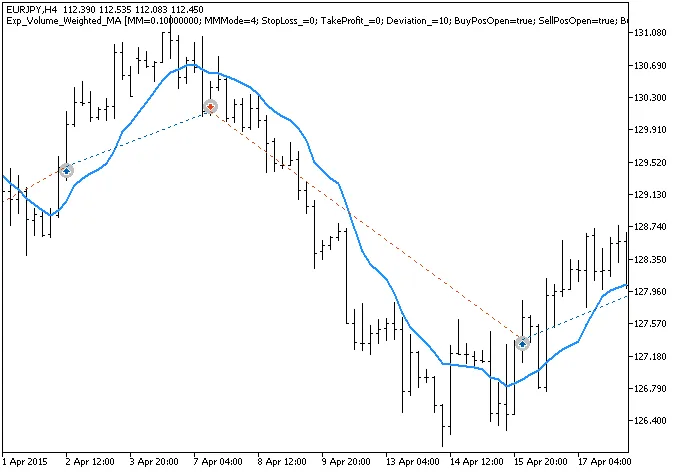
Fig.1. The instances of history of deals on the chart.
Now, let’s take a look at the testing results for 2015 on the EURJPY H4:
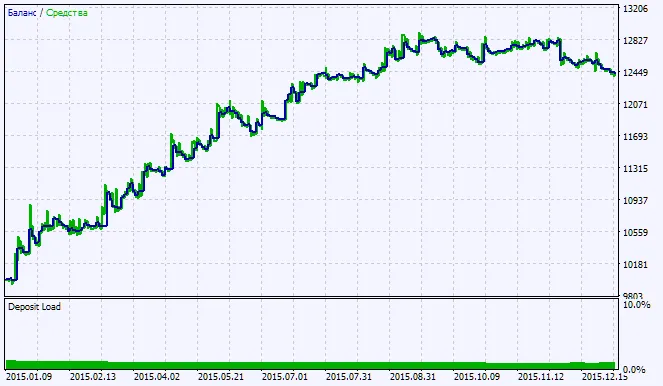
Fig.2. Testing results chart




Comments 0