
The Exp_CronexCCI EA is a powerful trading tool designed to enhance your trading experience on MetaTrader 5. This expert advisor operates based on signals generated by the renowned CronexCCI oscillator.
So, how does it work? The EA generates a trading signal when a bar closes and there's a shift in the color of the indicator cloud. This is a crucial moment that can open the door to profitable trades.
Before you get started, make sure you have the CronexCCI.ex5 compiled indicator file. You’ll need to place this file in your <terminal_data_folder>\MQL5\Indicators directory to ensure everything runs smoothly.
Additionally, the TradeAlgorithms.mqh library file is essential for using Expert Advisors with brokers that offer a non-zero spread. It also allows you to set up your Stop Loss and Take Profit levels right when you open a position. You can find more variations of this library by following this link: Trade Algorithms.
During the tests shown below, we utilized the default input parameters for the Expert Advisor. Notably, Stop Loss and Take Profit were not employed in these tests, giving you a pure view of the EA's performance.
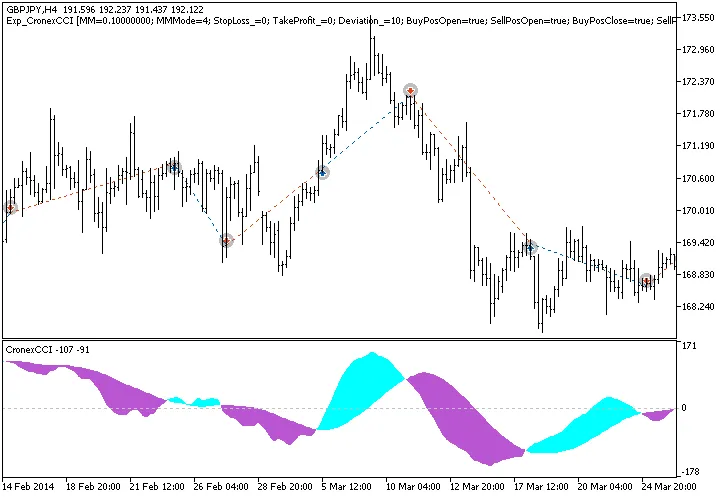
Fig.1. Trade examples on the chart
Here are the testing results for 2014 on GBPJPY H4:
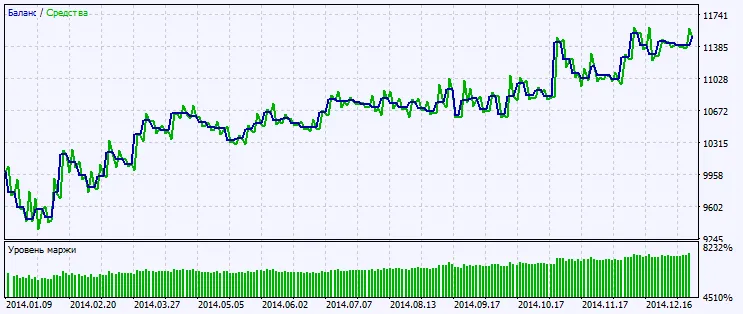
Fig.2. Testing results chart




Comments 0